Modern software delivery demands unprecedented speed. Organizations deploy microservices, containerized workloads, and cloud-native applications multiple times a day. However, velocity frequently collides with operational stability. Traditional deployment methods—such as in-place updates or rolling upgrades on limited hardware—often expose live production environments to severe risks. Common production deployment challenges include unexpected downtime, failed database migrations, unhandled configuration drift, and cascading service interruptions. When a release fails midway through an in-place update, services often enter a degraded, half-baked state. Reverting requires rolling back code, rolling back schema changes, and scrambling to restore service while angry customers experience timeouts and error pages. These incidents damage business revenue, erode customer trust, and create severe operational friction between development and operations teams.
To mitigate these risks, modern engineering teams adopt advanced release patterns that decouple application deployment from live traffic routing. Among these, Blue-Green Deployment stands out as a reliable mechanism to eliminate release window downtime. Yet, moving from traditional release patterns to a fully automated Blue-Green architecture is rarely straightforward. It requires careful infrastructure design, robust state management, and rigorous automation. This is where professional DevOps consulting becomes invaluable. Expert consultants help engineering managers, platform teams, and cloud architects assess existing application dependencies, design symmetrical production environments, and establish reliable automated traffic-switching and rollback procedures. For professionals looking to build foundational and advanced competencies in these modern release methodologies, continuous learning platforms like DevOpsSchool serve as valuable resources for professional development and practical engineering knowledge.
Understanding the Blue-Green Deployment Model
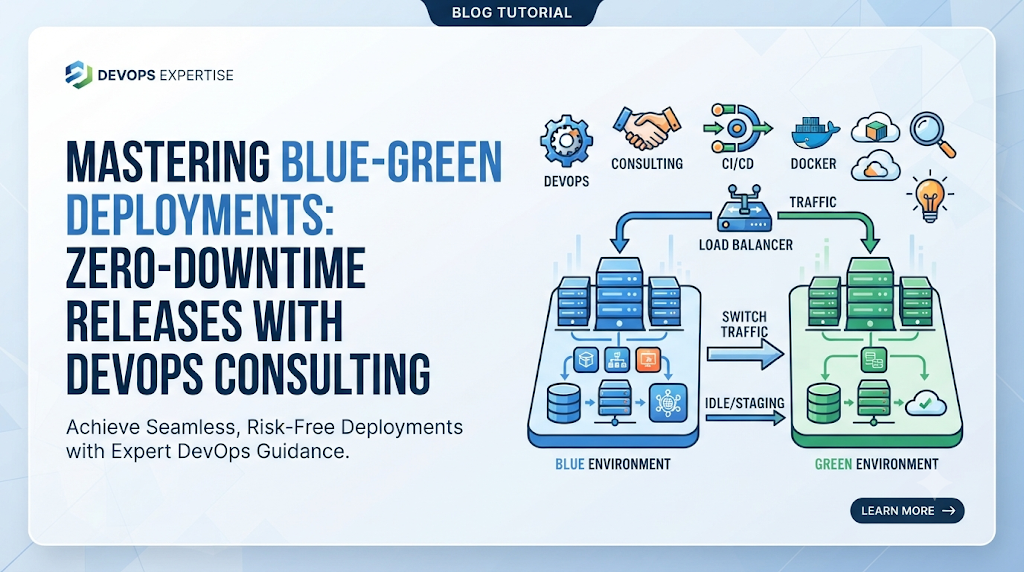
At its core, the Blue-Green Deployment model relies on running two identical production environments simultaneously. At any given time, only one environment serves live production traffic, while the other remains idle, serving as a staging ground for the next release.
[ External Traffic ] ---> [ Load Balancer / Ingress ]
                                   |
                      +------------+------------+
                      |                         |
               [ Blue Environment ]      [ Green Environment ]
                  (Live / Active)            (Idle / Staging)
Defining Blue and Green Environments
- The Blue Environment: This represents the currently running, stable version of the application that handles all live user traffic.
- The Green Environment: This represents the newly deployed version of the application. It receives internal testing, validation, and smoke tests before it ever sees live external traffic.
The Traffic Routing Mechanism
Production traffic moves between environments through a centralized routing layer, such as a cloud load balancer, a reverse proxy, an API gateway, or a Kubernetes Ingress controller. Instead of modifying the application code in-place, the release process consists of deploying the new version to the idle environment, verifying its health, and flipping a switch at the routing layer to redirect incoming connections instantly.
The Deployment Lifecycle
- Current State: Blue is active and serving 100% of production traffic. Green is idle or running the previous release.
- Deployment: Engineers deploy the new version (v2) into the Green environment.
- Verification: Automated tests, integration checks, and manual smoke tests run exclusively against Green.
- Traffic Switch: The load balancer configuration updates to route all incoming requests from Blue to Green.
- Observation: The team monitors error rates, latency, and resource utilization on Green.
- Resolution: If successful, Blue is updated with the new version during the next cycle or kept as an immediate fallback. If an anomaly occurs, traffic switches back to Blue within seconds.
What a DevOps Consultant Evaluates Before Implementation
Implementing a Blue-Green deployment pattern without a thorough assessment often leads to infrastructure bloat, database corruption, or split-brain application states. When organizations engage external expertise, consultants conduct a comprehensive technical audit across multiple operational vectors.
1. Existing Application Architecture and Deployment Process
Consultants analyze whether the application is designed for parallel execution. Monolithic systems with hardcoded local file dependencies or tightly coupled components require refactoring before they can support multi-environment isolation.
2. Infrastructure Capacity and Environment Readiness
Running two production-grade environments requires sufficient compute, memory, and networking capacity. Consultants evaluate cloud resource quotas, node auto-scaling policies, and financial cost implications to ensure duplicate infrastructure remains economically viable.
3. Database Dependencies and Stateful Services
Because stateless application nodes are easy to duplicate, databases represent the primary architectural bottleneck. Consultants examine database topologies, connection pooling limits, replication lag, and schema evolution strategies to ensure both environments can interact with data stores safely without causing race conditions.
4. Traffic Patterns and Availability Requirements
Understanding peak traffic hours, geographic distribution, and Service Level Objectives (SLOs) helps consultants determine the exact routing mechanisms and health-check tolerances required during a switchover.
5. Monitoring, Observability, and Rollback Capabilities
A fast traffic switch is useless without instant feedback. Consultants audit existing telemetry stacks—such as Prometheus, Grafana, OpenTelemetry, and centralized logging—to ensure automated alerts fire immediately upon deployment degradation.
Designing Two Production-Ready Environments
Creating symmetrical Blue and Green environments requires rigorous discipline to eliminate configuration drift.
Infrastructure Sizing and Resource Planning
Both environments must possess identical resource allocations to prevent performance degradation when traffic shifts. If Blue runs on a cluster capable of handling peak loads with 50% CPU headroom, Green must mirror that exact capacity.
Environment Parity and Configuration Consistency
Manual configuration breeds errors. Consultants enforce Infrastructure as Code (IaC) tools like Terraform or OpenTofu to provision both environments from a single source of truth. Environment-specific variables are managed via secure parameter stores rather than hardcoded configuration files.
Network and Load-Balancer Architecture
The network topology must support seamless IP or DNS routing changes. Consultants configure cloud-native load balancers (such as AWS ALBs or GCP HTTP(S) Load Balancers) or Kubernetes Service meshes (such as Istio or Linkerd) to manage traffic weights dynamically.
Container and Kubernetes Deployment Considerations
In Kubernetes ecosystems, Blue-Green deployments are typically managed using separate Kubernetes Namespaces or distinct Deployment objects combined with immutable Service selectors. This ensures that rolling out a new release updates label selectors atomically, shifting all endpoints from the old ReplicaSet to the new one in a single operation.
A Practical Blue-Green Implementation Journey
To understand how a consulting-led Blue-Green release works in practice, examine the following step-by-step workflow for a containerized microservice application.
Step 1: Review the Existing Production Environment
The system is operating on v1.0.0 in the Blue environment. Monitoring dashboards show nominal CPU usage, zero error rates, and stable database connection pools.
Step 2: Prepare the Inactive Deployment Environment
The Green environment is verified as clean and synchronized with the core infrastructure baseline. Network security groups, IAM policies, and secret attachments are confirmed to match Blue precisely.
Step 3: Build and Publish the Application Artifact
The CI/CD pipeline compiles the source code for v1.1.0, runs static code analysis, executes unit tests, and packages the application into an immutable container image pushed to a secure container registry.
Step 4: Deploy the New Version to the Inactive Environment
The pipeline triggers a deployment script that updates the Green environment with the new container image tag (v1.1.0), spinning up pods or virtual machines without touching the live Blue routing paths.
Step 5: Run Smoke Tests and Health Checks
Automated test suites bombard Green’s internal endpoints. Health check endpoints (/healthz) return HTTP 200 OK responses, verifying that database connections, cache layers, and external API integrations are fully operational.
Step 6: Validate Application Configuration
Engineers and automated audit tools inspect environment variables, feature flag states, and telemetry instrumentation to ensure v1.1.0 is behaving identically under staging conditions.
Step 7: Prepare the Traffic-Switching Process
The load balancer target group weights are staged. Instead of an abrupt cut, some advanced configurations use weighted routing to send a tiny fraction of traffic (e.g., 1%) as a final sanity check, though standard Blue-Green shifts 100% of traffic once verified.
Step 8: Route Production Traffic to the New Environment
The load balancer configuration updates. The Ingress router or DNS record points active user sessions to the Green environment. Green is now the active production environment.
Step 9: Monitor the Release and Retain the Previous Environment
The team observes error logs, latency spikes, and user-facing transactions. The Blue environment is kept online and idle, serving as an instant safety net in case an unpredicted edge-case bug surfaces in production.
Integrating Blue-Green Releases With CI/CD Pipelines
Automation is the backbone of repeatable deployments. DevOps consultants integrate Blue-Green release patterns directly into CI/CD pipelines (using platforms like GitHub Actions, GitLab CI, Jenkins, or Argo CD).
Pipeline Workflow Architecture
- Source & Build Stage: Code commit triggers automated builds and artifact tagging.
- Automated Testing: Unit, integration, and security vulnerability scans execute against the build.
- Staging Deployment: The artifact deploys automatically to the inactive environment (Green).
- Automated Validation: Synthetic transactions and health checks run against the new environment.
- Approval Gate: For high-security environments, a manual sign-off prompt appears for engineering managers, while automated pipelines proceed directly in mature DevOps cultures.
- Traffic Shift & Rollback Hook: The pipeline executes the load balancer update command. If error rates exceed a defined threshold within a 5-minute observation window, an automated rollback hook triggers, reverting the load balancer back to the previous environment.
Managing Database Changes and Stateful Applications
One of the most complex challenges in Blue-Green deployments is managing databases. While stateless application containers can be duplicated effortlessly, shared relational databases cannot simply be cloned instantly without risking data divergence.
Backward-Compatible Database Migrations
If version v1.1.0 of an application requires a database schema change (such as renaming a column or adding a mandatory constraint), deploying it directly will break the currently running Blue environment (v1.0.0). Consultants solve this using expand-and-contract (multiphase) migration patterns:
- Phase 1 (Expand): Update the database schema to support both the old and new application versions simultaneously (e.g., add a new nullable column or create a new table).
- Phase 2 (Migrate): Deploy the application version that populates both old and new structures while reading from the old structure. Run background data backfill jobs.
- Phase 3 (Switch): Execute the Blue-Green traffic switch to the new application version that relies on the new schema structure.
- Phase 4 (Contract): In a subsequent release, once the old version is fully decommissioned, remove the legacy database columns or tables.
Session Management and Message Queues
To prevent user session loss during a switch, applications must externalize session state into distributed data stores like Redis or Memcached rather than relying on local server memory. Similarly, message consumers (such as RabbitMQ or Kafka workers) must be backward-compatible with existing event payloads.
Traffic Switching, Validation, and Rollback Decisions
The moment of traffic switching is critical. Even with meticulous testing, unexpected issues can emerge when real-world user traffic hits a new release.
Pre-Switch Validation Checklist
- Are all replica pods in the inactive environment reporting healthy status?
- Have database migration scripts completed successfully and without locks?
- Are external third-party webhook integrations pointed correctly?
Traffic-Switching Methods
- Load Balancer Target Group Swapping: Updating AWS ALB/ELB rules to point listener rules from Target Group A to Target Group B.
- DNS TTL Manipulation: Lowering Time-To-Live values prior to deployment and updating A/CNAME records (note: DNS caching can introduce propagation delays, making load balancers preferable).
- Kubernetes Ingress / Service Mesh Routing: Modifying selector labels or virtual service weights in Istio for instantaneous packet redirection.
Rollback Protocols
If error logs spike or latency degrades post-switch, the team must not attempt forward fixes in production. Instead, they execute the immediate rollback script, reverting the load balancer routing rules back to the previous environment within seconds.
Blue-Green Deployment Across Cloud and Container Platforms
Implementation details vary significantly depending on the underlying technology stack.
- AWS Environments: Leveraging Application Load Balancers (ALBs), Auto Scaling Groups, and Route 53 or ECS/EKS task revisions.
- Azure Environments: Utilizing Azure Front Door, Traffic Manager, or Kubernetes Service (AKS) with Application Gateway Ingress Controller (AGIC).
- Google Cloud Deployments: Utilizing Cloud Load Balancing, Managed Instance Groups, or Google Kubernetes Engine (GKE) with Anthos or Istio service meshes.
- Kubernetes Ecosystems: Implementing GitOps workflows with Argo CD or Flux, utilizing custom resource definitions like Argo Rollouts for automated progressive and blue-green traffic shifts.
- Traditional VM Environments: Utilizing Nginx or HAProxy reverse proxies with upstream pool switching scripts orchestrated via Ansible or Bash.
Common Implementation Mistakes and Their Consequences
Organizations attempting Blue-Green deployments without expert guidance often encounter recurring pitfalls:
- Environment Configuration Drift: Failing to synchronize environment variables between Blue and Green leads to bizarre bugs that only appear in production. Consulting fix: Enforce strict IaC and automated parity auditing.
- Unplanned Database Changes: Making breaking schema changes without backward compatibility breaks the active environment during deployment. Consulting fix: Implement expand-and-contract migration pipelines.
- Missing Health Checks: Relying solely on process startup instead of deep dependency checks causes the load balancer to route traffic to an app whose database connection pool is failing. Consulting fix: Implement comprehensive liveness, readiness, and startup probes.
- Shared Resource Conflicts: Two environments writing to the same local file storage or cache keys. Consulting fix: Decouple stateful assets into isolated, scalable object stores and distributed caches.
Choosing Between Blue-Green, Canary, and Rolling Deployments
No single deployment strategy fits every workload. Engineering teams must evaluate trade-offs carefully.
| Strategy | Complexity | Infrastructure Cost | Rollback Speed | Release Validation | Best Suited For |
| Blue-Green | Medium | High (2x resources) | Instant | Full pre-production verification | Mission-critical apps needing zero downtime |
| Canary | High | Low to Medium | Fast | Real-world progressive user traffic | Microservices with robust telemetry |
| Low-Risk Rolling | Low | Low (In-place) | Slow | Incremental instance replacement | Standard web applications and internal tools |
Measuring Deployment Reliability and Business Impact
To justify infrastructure investments and continuously refine release pipelines, organizations must track key operational metrics:
- Deployment Frequency & Duration: How often code reaches production and how fast the release cycle executes.
- Change Failure Rate: The percentage of deployments causing production incidents.
- Mean Time to Recovery (MTTR): How quickly the system recovers when a failure occurs.
- Rollback Frequency: Tracking how often deployments require falling back to the previous environment.
- Infrastructure Cost per Release: Ensuring duplicate environments do not inflate cloud operational expenditures unnecessarily.
A Practical Roadmap for DevOps Consulting Engagements
A successful consulting engagement follows a structured, collaborative roadmap:
- Initial Discovery & Technical Assessment: Auditing current codebase, infrastructure, CI/CD tools, and database topologies.
- Deployment Architecture Design: Crafting symmetrical environment blueprints, network routing strategies, and rollback workflows.
- Pipeline & Infrastructure Preparation: Writing IaC modules, configuring container registries, and setting up automated testing suites.
- Proof of Concept (PoC): Executing a simulated Blue-Green release in a non-production staging environment.
- Production Rollout & Cutover: Executing the first live deployment under consultant supervision.
- Knowledge Transfer & Documentation: Training internal engineering teams to operate, monitor, and troubleshoot the new pipeline independently.
Frequently Asked Questions
What is Blue-Green Deployment in DevOps?
It is a release management strategy where two identical production environments (Blue and Green) operate simultaneously. Only one handles live traffic, allowing teams to deploy and test updates on the idle environment before switching traffic instantly.
How does Blue-Green Deployment reduce release risk?
It separates the deployment phase from the release phase. Because the new code runs and undergoes validation in an isolated environment before touching real users, faulty releases can be intercepted and reverted immediately without causing downtime.
Can Blue-Green Deployment support zero-downtime releases?
Yes. When combined with proper load balancers, health checks, and backward-compatible database migrations, user requests transition between application versions without dropped connections or error pages.
Is it possible to use Blue-Green Deployment with Kubernetes?
Absolutely. Kubernetes makes Blue-Green deployments highly efficient through namespace isolation, service label selectors, or advanced GitOps controllers like Argo Rollouts that automate traffic shifting between ReplicaSets.
How should database migrations be handled?
Database migrations must follow backward-compatible design patterns (such as expand-and-contract methods) so that both the old and new application versions can interact with the data store during the transition window.
What happens if the new environment fails after traffic switching?
If monitoring alerts detect anomalies, the load balancer routing configuration instantly switches production traffic back to the previous environment while engineers investigate the failure in isolation.
Does Blue-Green Deployment require double infrastructure?
In its purest form, yes—running two parallel production environments requires double the compute and memory resources. However, modern containerized platforms can optimize resource sharing or scale down inactive environments when cost efficiency is paramount.
How is Blue-Green Deployment different from Canary Deployment?
Blue-Green deployments shift 100% of production traffic from one complete environment to another instantly after verification. Canary deployments route a small percentage of traffic (e.g., 5%) to the new version first, gradually increasing traffic as stability is proven.
When should an organization hire a DevOps consultant for deployment modernization?
Organizations should seek consulting support when experiencing frequent deployment failures, prolonged release windows, high rollback friction, or when preparing to migrate monolithic applications to cloud-native Kubernetes architectures.
Final Perspective: Making Deployment Changes More Predictable
Achieving reliable software delivery is not merely a matter of acquiring modern tools or spinning up duplicate servers; it requires operational discipline, architectural foresight, and rigorous automation. Blue-Green deployment patterns offer a powerful pathway to eliminate release downtime and restore confidence to engineering teams. However, their success depends entirely on how well an organization manages state, validates releases, and prepares for the unexpected. By partnering with experienced practitioners, organizations can build robust pipelines, tame database complexity, and establish fault-tolerant release workflows that scale seamlessly. For individuals and teams eager to deepen their expertise in release engineering, automation, and modern deployment methodologies, exploring professional learning opportunities through DevOpsSchool provides a solid foundation for continuous engineering excellence.

Best Cardiac Hospitals Near You
Discover top heart hospitals, cardiology centers & cardiac care services by city.
Advanced Heart Care • Trusted Hospitals • Expert Teams
View Best Hospitals