Handling Dependency and Null Safety Issues in Flutter: A Complete Guide
When working with Flutter projects, you may encounter errors related to dependency versions and null safety, especially if you’re using an outdated or incompatible package. In this article, we’ll walk you through a common error and how to resolve it using the flutter pub outdated command.
The Issue
[holidaylandmark] flutter pub get --no-example
Resolving dependencies...
The current Dart SDK version is 3.3.3.

Because flutter_icons 1.1.0 doesn't support null safety and no versions of flutter_icons match >1.1.0 <2.0.0, flutter_icons ^1.1.0 is forbidden.
So, because holidaylandmark depends on flutter_icons ^1.1.0, version solving failed.

The lower bound of "sdk: '>=2.0.0-dev.68.0 <3.0.0'" must be 2.12.0 or higher to enable null safety.
For details, see https://dart.dev/null-safety
exit code 1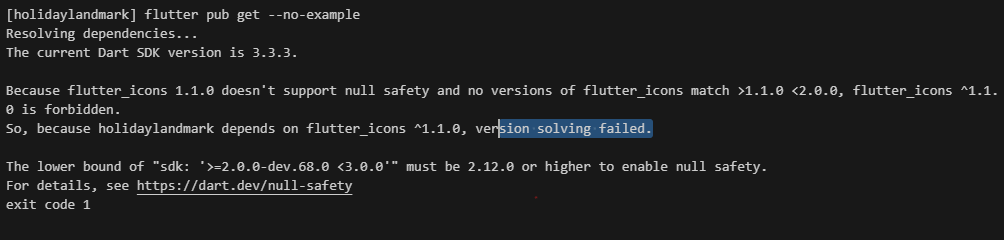
Let’s say you run the following command to get your Flutter dependencies:
flutter pub get --no-exampleYou might encounter an error that looks like this:
Resolving dependencies...
The current Dart SDK version is 3.3.3.

Because flutter_icons 1.1.0 doesn't support null safety and no versions of flutter_icons match >1.1.0 <2.0.0, flutter_icons ^1.1.0 is forbidden.
So, because holidaylandmark depends on flutter_icons ^1.1.0, version solving failed.

The lower bound of "sdk: '>=2.0.0-dev.68.0 <3.0.0'" must be 2.12.0 or higher to enable null safety.
For details, see https://dart.dev/null-safety
exit code 1
This error occurs because the package flutter_icons is not compatible with your current Dart SDK version (3.3.3) and does not support null safety, a feature introduced in Dart 2.12.0.
Understanding the Problem
- Null Safety: Ensures that no variable that hasn’t been initialized is accessed, reducing runtime errors.
- Dependency Version Incompatibility: Occurs when a package you’re using doesn’t support your Dart SDK’s version or lacks null safety support.
The Solution
To resolve this, you need to identify outdated packages and find compatible versions. Here’s how to do it:
- Identify Outdated Packages: Run the following command to list outdated packages:
flutter pub outdatedThis will display a table showing the current, upgradable, resolvable, and latest versions of your dependencies.
- Find Outdated Packages in Development Mode: Use this command to get more details, including pre-release versions:
flutter pub outdated --mode=devThis command helps you identify packages that need upgrading to support null safety or compatibility with the latest Dart SDK.
- Update the Dependencies: Open your
pubspec.yamlfile and update the package version. For example:
   dependencies:
     flutter_icons: ^2.0.0
Make sure the version you’re updating to supports null safety and is compatible with your Dart SDK version.
- Run
flutter pub get: After updating yourpubspec.yaml, run:
flutter pub getThis should resolve the version conflict and update your dependencies successfully.
Additional Tips
- Always refer to the Dart null safety migration guide for understanding how null safety works.
- Regularly update your Flutter SDK and packages to avoid compatibility issues.
Conclusion
By following these steps, you can resolve dependency issues related to null safety and ensure that your Flutter projects run smoothly. This process is essential for keeping your project up-to-date, stable, and aligned with the latest Flutter and Dart improvements.

I’m Abhishek, a DevOps, SRE, DevSecOps, and Cloud expert with a passion for sharing knowledge and real-world experiences. I’ve had the opportunity to work with Cotocus and continue to contribute to multiple platforms where I share insights across different domains:
-
DevOps School – Tech blogs and tutorials
-
Holiday Landmark – Travel stories and guides
-
Stocks Mantra – Stock market strategies and tips
-
My Medic Plus – Health and fitness guidance
-
TrueReviewNow – Honest product reviews
-
Wizbrand – SEO and digital tools for businesses
I’m also exploring the fascinating world of Quantum Computing.
Best Cardiac Hospitals Near You
Discover top heart hospitals, cardiology centers & cardiac care services by city.
Advanced Heart Care • Trusted Hospitals • Expert Teams
View Best Hospitals