Best Cosmetic Hospitals Near You

Compare top cosmetic hospitals, aesthetic clinics & beauty treatments by city.

Trusted • Verified • Best-in-Class Care

Explore Best Hospitals

How to Find and Free Port 80 in Windows Using CMD

📄 Here’s an Guide for You:

How to Find and Free Port 80 in Windows Using CMD

In Windows, port 80 is commonly used by web servers like Apache, IIS, or Nginx. If you’re running into port conflicts — for example, when setting up XAMPP — you need to find and free port 80. This guide explains how to check which application is using port 80 and how to stop it.


Step 1 – Check Which Process is Using Port 80

Open Command Prompt (CMD) and run:

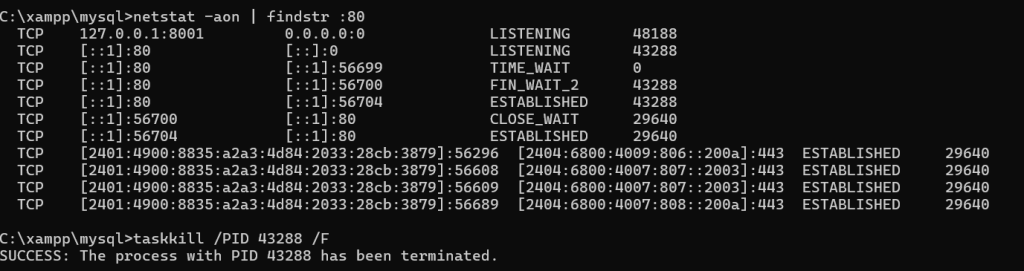
netstat -aon | findstr :80

This command lists all processes using port 80, showing something like:

  TCP    127.0.0.1:8001         0.0.0.0:0              LISTENING       48188
  TCP    [::1]:80               [::]:0                 LISTENING       43288
  TCP    [::1]:80               [::1]:56699            TIME_WAIT       0
  TCP    [::1]:80               [::1]:56700            FIN_WAIT_2      43288
  TCP    [::1]:80               [::1]:56704            ESTABLISHED     43288
  TCP    [::1]:56700            [::1]:80               CLOSE_WAIT      29640
  TCP    [::1]:56704            [::1]:80               ESTABLISHED     29640
  TCP    [2401:4900:8835:a2a3:4d84:2033:28cb:3879]:56296  [2404:6800:4009:806::200a]:443  ESTABLISHED     29640
  TCP    [2401:4900:8835:a2a3:4d84:2033:28cb:3879]:56608  [2404:6800:4007:807::2003]:443  ESTABLISHED     29640
  TCP    [2401:4900:8835:a2a3:4d84:2033:28cb:3879]:56609  [2404:6800:4007:807::2003]:443  ESTABLISHED     29640
  TCP    [2401:4900:8835:a2a3:4d84:2033:28cb:3879]:56689  [2404:6800:4007:808::200a]:443  ESTABLISHED     29640
  • LISTENING means the process is actively using port 80.
  • 43288 is the PID (Process ID) — the process responsible for using port 80.
Step 2 – Identify the Process Name

Once you have the PID, run:

tasklist | findstr 43288

Replace 43288 with the PID you found. This will tell you which program is using the port. It could be:

ProcessDescription
httpd.exeApache (often from XAMPP)
w3wp.exeIIS (Microsoft’s web server)
nginx.exeNginx server
SystemSometimes Windows services like World Wide Web Publishing Service can occupy port 80

Step 3 – Stop the Process

If you want to free port 80 immediately, you can terminate the process using:

taskkill /PID 43288 /F
  • /F forces termination.
  • Replace 43288 with the correct PID.

Step 4 – Optional: Disable Unwanted Services (Permanent Fix)

If it’s IIS:

You can disable IIS (Internet Information Services) via:

  1. Press Windows + R, type optionalfeatures and press Enter.
  2. Uncheck:
    • Internet Information Services.
    • World Wide Web Services.
  3. Click OK.

If it’s Apache from XAMPP:

Use the XAMPP Control Panel to stop/start Apache safely.


⚠️ Important Tips

  • Killing processes directly is a temporary fix.
  • If you need port 80 permanently free, check Windows Services to find auto-start services using port 80.

Summary of Commands

CommandPurpose
`netstat -aonfindstr :80`
`tasklistfindstr `
taskkill /PID <PID> /FForce kill the process using port 80

Best Cardiac Hospitals Near You

Discover top heart hospitals, cardiology centers & cardiac care services by city.

Advanced Heart Care • Trusted Hospitals • Expert Teams

View Best Hospitals
<p data-start="140" data-end="435">I’m Abhishek, a DevOps, SRE, DevSecOps, and Cloud expert with a passion for sharing knowledge and real-world experiences. I’ve had the opportunity to work with <a class="decorated-link" href="https://www.cotocus.com/" target="_new" rel="noopener" data-start="300" data-end="335">Cotocus</a> and continue to contribute to multiple platforms where I share insights across different domains:</p> <ul data-start="437" data-end="922"> <li data-start="437" data-end="514"> <p data-start="439" data-end="514"><a class="decorated-link" href="https://www.devopsschool.com/" target="_new" rel="noopener" data-start="439" data-end="485">DevOps School</a> – Tech blogs and tutorials</p> </li> <li data-start="515" data-end="599"> <p data-start="517" data-end="599"><a class="decorated-link" href="https://www.holidaylandmark.com/" target="_new" rel="noopener" data-start="517" data-end="569">Holiday Landmark</a> – Travel stories and guides</p> </li> <li data-start="600" data-end="684"> <p data-start="602" data-end="684"><a class="decorated-link" href="https://www.stocksmantra.in/" target="_new" rel="noopener" data-start="602" data-end="647">Stocks Mantra</a> – Stock market strategies and tips</p> </li> <li data-start="685" data-end="764"> <p data-start="687" data-end="764"><a class="decorated-link" href="https://www.mymedicplus.com/" target="_new" rel="noopener" data-start="687" data-end="732">My Medic Plus</a> – Health and fitness guidance</p> </li> <li data-start="765" data-end="841"> <p data-start="767" data-end="841"><a class="decorated-link" href="https://www.truereviewnow.com/" target="_new" rel="noopener" data-start="767" data-end="814">TrueReviewNow</a> – Honest product reviews</p> </li> <li data-start="842" data-end="922"> <p data-start="844" data-end="922"><a class="decorated-link" href="https://www.wizbrand.com/" target="_new" rel="noopener" data-start="844" data-end="881">Wizbrand</a> – SEO and digital tools for businesses</p> </li> </ul> <p data-start="924" data-end="1021">I’m also exploring the fascinating world of <a class="decorated-link" href="https://www.quantumuting.com/" target="_new" rel="noopener" data-start="968" data-end="1018">Quantum Computing</a>.</p>

Related Posts

Building Digital Resilience: Integrating Intelligence, Cloud Foundations, and DevOps for Long-Term Growth

Delivering digital software in today’s competitive market demands far more than a basic web page or an isolated mobile utility. Enterprises across India are rapidly modernizing their…

Read More

Accelerating Software Delivery: Integrating Cloud, DevOps, and SRE for Robust IT Systems

Introduction Today’s engineering organizations face an ongoing tug-of-war between releasing software at lightning speed and keeping production environments secure, stable, and cost-efficient. Pushing updates rapidly gives businesses…

Read More

Driving Enterprise Growth Through Modern Engineering, Cloud, and Intelligent Infrastructure

Introduction In today’s fast-paced digital ecosystem, companies rely heavily on robust applications, cloud architecture, artificial intelligence, and automated pipelines to stay competitive. However, simply bolting on disconnected…

Read More

Engineering a Powerful Digital Presence: Strategic Foundations for Web Growth

Establishing a credible footprint on the internet involves far more than putting up a basic landing page or an electronic brochure. Today, your website acts as the…

Read More

Maximizing Analytical Reliability: What Is DataOps? A Blueprint for Modern Data Engineering

Introduction Every contemporary enterprise relies heavily on information to shape commercial strategy, fuel customer-facing applications, and power predictive machine-learning models. Yet, as companies rush to adopt cloud…

Read More

Uncovering Amaravati: History, Attractions, and Local Happenings

Where ancient traditions meet the peaceful waters of the Krishna River and modern growth, you find the city of Amaravati. Whether you call the area home or…

Read More
5 1 vote
Article Rating
Subscribe
Notify of
guest
0 Comments
Oldest
Newest Most Voted
0
Would love your thoughts, please comment.x
()
x