Here’s a clean, copy-paste Production Runbook for your current setup (Ubuntu + LAMPP/Apache reverse proxy + Keycloak in /opt/auth.holidaylandmark.com), making sure it starts on boot, auto-recovers, and serves reliably over https://auth.holidaylandmark.com/.
I’ve included all steps end-to-end: prerequisites, config edits, Apache modules, WebSocket support, systemd service, verification, and common fixes.
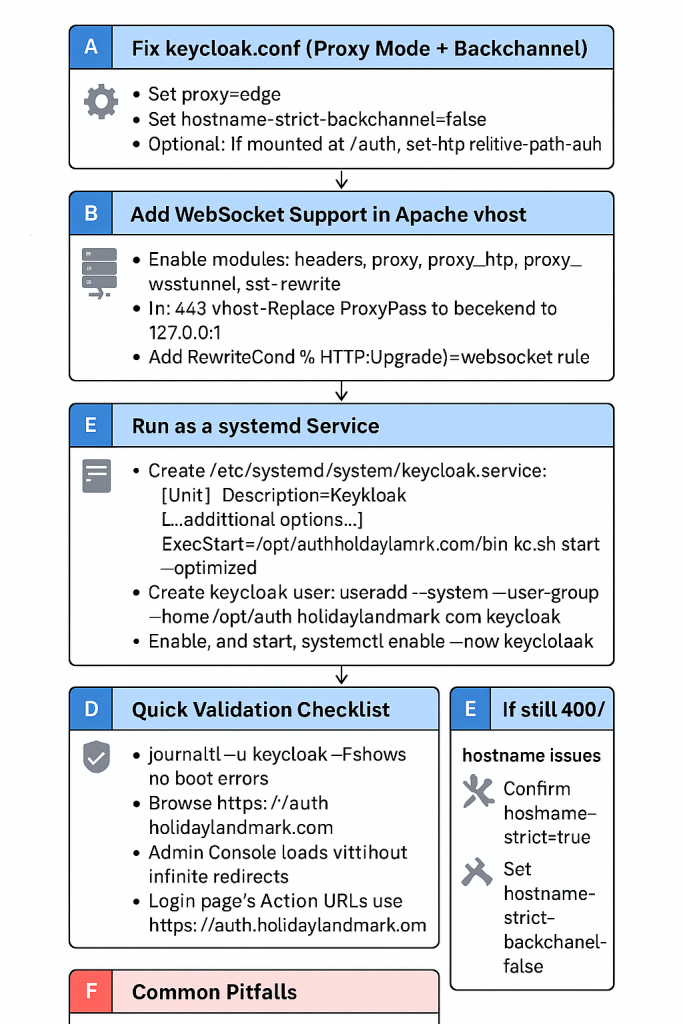
Keycloak @ auth.holidaylandmark.com — Production Runbook
0) Prerequisites (one-time)
# Update system packages
sudo apt update

# Ensure Java 17+ is available (Temurin/OpenJDK). Example for OpenJDK 17:
sudo apt install -y openjdk-17-jre

# Confirm Java
java -version
Keycloak 22+ requires Java 17+. Keep using your existing LAMPP (XAMPP on Linux) for Apache/SSL.
1) Create service user and permissions (one-time)
# Create a dedicated OS user for Keycloak
sudo useradd --system --user-group --home /opt/auth.holidaylandmark.com keycloak

# Give ownership of the Keycloak directory
sudo chown -R keycloak:keycloak /opt/auth.holidaylandmark.com
2) Configure Keycloak (keycloak.conf)
Edit: /opt/auth.holidaylandmark.com/conf/keycloak.conf
Use these values (replace credentials if needed):
# ===============================
# Keycloak Production Config (Apache TLS termination)
# Hostname: auth.holidaylandmark.com
# ===============================

# --- Database (MariaDB/MySQL over local socket) ---
db=mariadb
db-url=jdbc:mariadb://localhost:3306/keycloak_db?localSocket=/opt/lampp/var/mysql/mysql.sock
db-username=REPLACE_ME_USER
db-password=REPLACE_ME_PASSWORD

# Pooling (tune with your RAM/traffic)
db-pool-initial-size=5
db-pool-min-idle=5
db-pool-max-size=25
db-pool-prefill=true

# --- HTTP / Proxy (Apache terminates TLS) ---
http-enabled=true
http-port=8080
proxy=edge                 # IMPORTANT: TLS ends at Apache
proxy-headers=xforwarded   # Trust X-Forwarded-*

# --- Hostname ---
hostname=auth.holidaylandmark.com
hostname-strict=true
hostname-strict-backchannel=false  # Avoid 400s on internal callbacks

# If Keycloak is NOT mounted under /auth, leave this commented
# http-relative-path=/auth

# --- Cache / Health / Metrics / Logging ---
cache=local
health-enabled=true
metrics-enabled=true
log-level=INFO
hostname-debug=false
Why
proxy=edge? You terminate TLS at Apache and proxy to KC over HTTP:8080. This mode ensures correct URL building and cookie handling.
3) Apache (LAMPP) — enable required modules
Open /opt/lampp/etc/httpd.conf and ensure these lines are present (uncomment/add if needed):
LoadModule headers_module        modules/mod_headers.so
LoadModule proxy_module          modules/mod_proxy.so
LoadModule proxy_http_module     modules/mod_proxy_http.so
LoadModule proxy_wstunnel_module modules/mod_proxy_wstunnel.so
LoadModule ssl_module            modules/mod_ssl.so
LoadModule rewrite_module        modules/mod_rewrite.so
Restart Apache:
sudo /opt/lampp/lampp restart
4) Apache vhosts for auth.holidaylandmark.com
:80 → :443 redirect (keep as is)
/opt/lampp/etc/extra/httpd-vhosts.conf or wherever you keep vhosts:
<VirtualHost *:80>
    ServerName auth.holidaylandmark.com
    Redirect permanent / https://auth.holidaylandmark.com/
</VirtualHost>
:443 reverse proxy to Keycloak (with WebSocket support)
Edit your SSL vhost (you showed /opt/lampp/etc/extra/httpd-ssl.conf). Replace backend IP with 127.0.0.1 if Keycloak is on the same host (recommended):
<VirtualHost *:443>
    ServerName auth.holidaylandmark.com

    SSLEngine on
    SSLCertificateFile      /opt/lampp/etc/certs/auth.holidaylandmark.com/auth.holidaylandmark.com.cer
    SSLCertificateKeyFile   /opt/lampp/etc/certs/auth.holidaylandmark.com/auth.holidaylandmark.com.key
    SSLCACertificateFile    /opt/lampp/etc/certs/auth.holidaylandmark.com/fullchain.cer

    ErrorLog  "/opt/lampp/logs/auth.holidaylandmark.com_error_log_"

    # Security hardening
    Header always set Strict-Transport-Security "max-age=31536000; includeSubDomains; preload"

    ProxyPreserveHost On
    ProxyRequests Off

    # --- Prefer loopback if KC is on same box ---
    # If it's truly remote, replace 127.0.0.1 with that host/IP.
    ProxyPass        / http://127.0.0.1:8080/ retry=0
    ProxyPassReverse / http://127.0.0.1:8080/

    # Fix cookies if Keycloak sets cookie domain = backend host
    ProxyPassReverseCookieDomain 127.0.0.1 auth.holidaylandmark.com

    # Pass original scheme/host/port to Keycloak
    RequestHeader set X-Forwarded-Proto "https"
    RequestHeader set X-Forwarded-Host  "auth.holidaylandmark.com"
    RequestHeader set X-Forwarded-Port  "443"

    # --- WebSocket upgrade for admin console ---
    RewriteEngine On
    RewriteCond %{HTTP:Upgrade} =websocket [NC]
    RewriteRule /(.*) ws://127.0.0.1:8080/$1 [P,L]

    ProxyTimeout 120
</VirtualHost>
Restart Apache:
sudo /opt/lampp/lampp restart
If you must keep a public IP backend instead of 127.0.0.1, use it consistently in
ProxyPass,ProxyPassReverse,ProxyPassReverseCookieDomain, and the WebSocketRewriteRule.
5) First-time admin bootstrap (only if you don’t have admin)
Choose one method:
A. One-shot start with env vars:
export KC_BOOTSTRAP_ADMIN_USERNAME=admin
export KC_BOOTSTRAP_ADMIN_PASSWORD='Str0ngP@ss!'
sudo -u keycloak /opt/auth.holidaylandmark.com/bin/kc.sh start --optimized
# After confirming admin login works, Ctrl+C to stop (we’ll run as a service next).
B. Bootstrap command (preferred on newer KC):
export KC_BOOTSTRAP_ADMIN_PASSWORD='Str0ngP@ss!'
sudo -u keycloak /opt/auth.holidaylandmark.com/bin/kc.sh bootstrap-admin user \
  --username admin --password:env KC_BOOTSTRAP_ADMIN_PASSWORD
6) (Optional) Build/optimize Keycloak once
sudo -u keycloak /opt/auth.holidaylandmark.com/bin/kc.sh build
This precompiles/optimizes extensions and reduces start time.
7) Create a systemd service (always-on)
Create /etc/systemd/system/keycloak.service:
[Unit]
Description=Keycloak (auth.holidaylandmark.com)
After=network-online.target
Wants=network-online.target

[Service]
Type=simple
User=keycloak
Group=keycloak
WorkingDirectory=/opt/auth.holidaylandmark.com
Environment=JAVA_OPTS=-Xms512m -Xmx2048m
ExecStart=/opt/auth.holidaylandmark.com/bin/kc.sh start --optimized
ExecStop=/bin/kill -TERM $MAINPID
Restart=on-failure
RestartSec=5
TimeoutStartSec=120
LimitNOFILE=65535

[Install]
WantedBy=multi-user.target
Enable and start:
sudo systemctl daemon-reload
sudo systemctl enable --now keycloak
sudo systemctl start keycloak
sudo systemctl status keycloak
From now on, Keycloak will start on boot and auto-restart on failure.
8) Firewall (if UFW is enabled)
You’re serving through Apache only:
sudo ufw allow 'Apache Full'
sudo ufw status
9) Verification Checklist
- Service running
systemctl is-active keycloak # should print: active journalctl -u keycloak -f # tail logs; no errors - Port check (local)
ss -lntp | grep 8080 # Keycloak listening on 0.0.0.0:8080 ss -lntp | grep ':443 ' # Apache listening on :443 - Browser tests
- Open
https://auth.holidaylandmark.com/ - Admin console loads without infinite redirects
- Open page source on login: form/action URLs use https://auth.holidaylandmark.com/ (not
127.0.0.1:8080)
- Open
- If 400/hostname errors
- Confirm
hostname=auth.holidaylandmark.com - Ensure
proxy=edgeandproxy-headers=xforwarded - Keep
hostname-strict=trueandhostname-strict-backchannel=false(as in the config)
- Confirm
- Admin console save/test errors
- Almost always WebSocket/proxy misconfig: re-check Apache
mod_proxy_wstunneland theUpgraderewrite block.
- Almost always WebSocket/proxy misconfig: re-check Apache
10) Maintenance Commands
# Watch logs
sudo journalctl -u keycloak -f

# Apply config changes
sudo systemctl restart keycloak

# Show effective config (useful for debugging)
sudo -u keycloak /opt/auth.holidaylandmark.com/bin/kc.sh show-config

# Apache logs
tail -f /opt/lampp/logs/error_log
tail -f /opt/lampp/logs/auth.holidaylandmark.com_error_log_
11) Common Pitfalls (and exact fixes)
- Used
proxy=reencryptwhile Apache terminates TLS
➜ Setproxy=edgeinkeycloak.conf. - Missing WebSocket support (admin console issues)
➜ Enablemod_proxy_wstunneland add:RewriteEngine On RewriteCond %{HTTP:Upgrade} =websocket [NC] RewriteRule /(.*) ws://127.0.0.1:8080/$1 [P,L] - Backchannel strictness causes 400 on internal calls
➜hostname-strict-backchannel=false. - Proxying via public IP while both run on same host
➜ Prefer127.0.0.1forProxyPass/ProxyPassReverse/ProxyPassReverseCookieDomain/WebSocket rule. - Wrong cookie domain in browser
➜ EnsureProxyPassReverseCookieDomain 127.0.0.1 auth.holidaylandmark.com(or appropriate backend host).
12) Optional Hardening (later)
- Move DB credentials to environment variables or secrets manager.
- Set stricter JVM heap (
-Xms,-Xmx) per RAM. - Consider switching to a managed MariaDB/MySQL or PostgreSQL instance for durability.
You’re done
With the above, Keycloak will (a) always run via systemd, (b) serve HTTPS through Apache with proper proxy/WebSocket handling, and (c) behave correctly with proxy=edge and your hostname settings.

I’m Abhishek, a DevOps, SRE, DevSecOps, and Cloud expert with a passion for sharing knowledge and real-world experiences. I’ve had the opportunity to work with Cotocus and continue to contribute to multiple platforms where I share insights across different domains:
-
DevOps School – Tech blogs and tutorials
-
Holiday Landmark – Travel stories and guides
-
Stocks Mantra – Stock market strategies and tips
-
My Medic Plus – Health and fitness guidance
-
TrueReviewNow – Honest product reviews
-
Wizbrand – SEO and digital tools for businesses
I’m also exploring the fascinating world of Quantum Computing.
Best Cardiac Hospitals Near You
Discover top heart hospitals, cardiology centers & cardiac care services by city.
Advanced Heart Care • Trusted Hospitals • Expert Teams
View Best Hospitals