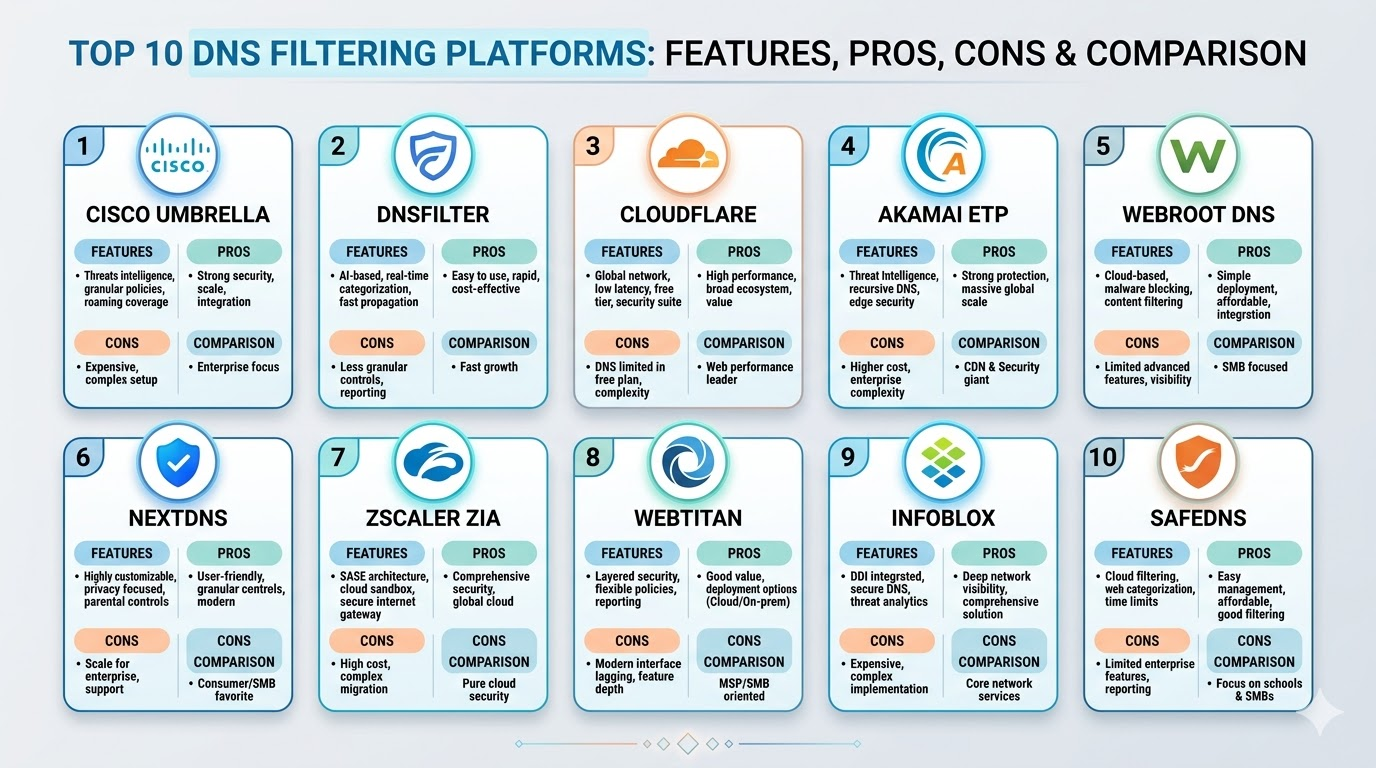
Introduction
DNS filtering has become one of the most effective and easiest-to-deploy layers of a modern “defense-in-depth” security strategy. By intercepting web requests at the Domain Name System layer—the “phonebook” of the internet—these platforms can block access to malicious sites, phishing scams, and inappropriate content before a connection is even established. In an era where remote work is the norm and the traditional network perimeter has dissolved, DNS filtering provides a consistent security umbrella that follows the user, regardless of their location or the device they are using.
The shift toward cloud-native security has made DNS filtering a cornerstone of the Secure Access Service Edge (SASE) model. Instead of relying on heavy on-premises appliances that require constant maintenance, organizations are now leveraging global distributed networks that offer near-zero latency and real-time threat intelligence. This allows IT teams to gain granular visibility into web traffic and enforce compliance policies across a global workforce with just a few clicks in a centralized dashboard.
Best for: Managed Service Providers (MSPs), school districts, mid-market enterprises, and distributed organizations looking for a low-overhead way to prevent ransomware and phishing attacks.
Not ideal for: Organizations that require deep packet inspection (DPI) of encrypted traffic for all web protocols, or those needing highly specialized application-layer firewalls for internal data centers.
Key Trends in DNS Filtering Platforms
- AI-Driven Threat Discovery: Platforms are using machine learning to analyze domain registration patterns and identify “look-alike” phishing sites minutes after they are created.
- Integration with SASE Frameworks: DNS filtering is no longer a standalone product; it is being bundled into broader “Secure Internet Gateway” solutions.
- Encrypted DNS Support: Growing adoption of DNS-over-HTTPS (DoH) and DNS-over-TLS (DoT) to prevent eavesdropping and tampering by third parties.
- Roaming Client Sophistication: Lightweight agents that ensure security policies stay active even when a laptop leaves the corporate Wi-Fi and connects to a public hotspot.
- IoT Device Protection: Specialized filtering for “headless” devices that cannot run traditional security software but still need protection from botnets.
- App-Specific Blocking: The ability to block not just categories of sites, but specific sub-functions of an application, such as blocking the “chat” feature within a social network.
- Zero-Trust Integration: Using DNS logs as a signal for broader zero-trust access decisions based on the health and behavior of the requesting device.
- Localization and Geofencing: Blocking traffic to or from specific countries to comply with regional regulations or to mitigate localized cyberattack campaigns.
How We Selected These Tools
- Global Resolver Network: We prioritized platforms with a large, distributed footprint to ensure minimal latency for users in any region.
- Threat Intelligence Accuracy: Each tool was evaluated on the quality of its blocklists and its speed in identifying new malicious domains.
- Ease of Deployment: We looked for solutions that can be implemented via simple DNS forwarders, network-level integration, or lightweight agents.
- Reporting and Visibility: Priority was given to platforms that provide clear, actionable insights into blocked threats and user activity.
- MSP and Multi-Tenancy Support: Many selections were chosen based on their ability to manage multiple distinct organizations from a single interface.
- Policy Granularity: We selected tools that allow for detailed rules based on user groups, schedules, and specific content categories.
Top 10 DNS Filtering Platforms
1. Cisco Umbrella
Formerly known as OpenDNS, Cisco Umbrella is the industry giant in the DNS security space. It processes a massive portion of the world’s internet traffic, providing it with an unparalleled view of emerging global threats.
Key Features
- Predictive intelligence that identifies malicious domains before they are used in attacks.
- Highly reliable global anycast network with 100% uptime since 2006.
- Proxying of “risky” domains for deeper file inspection and URL analysis.
- Integration with Cisco SD-WAN for automated network-wide protection.
- Robust roaming client for off-network protection on all major operating systems.
Pros
- Unbeatable threat intelligence database fueled by the Cisco Talos team.
- Extremely scalable for the largest global enterprises.
Cons
- Pricing can be higher than many competitors, especially for advanced features.
- The management interface can be complex for very small organizations.
Platforms / Deployment
Windows / macOS / Linux / iOS / Android
Cloud / On-Network Forwarders
Security & Compliance
SSO/SAML, MFA, and SOC 2 Type II compliance.
GDPR and HIPAA ready.
Integrations & Ecosystem
Integrates deeply with the Cisco security stack, including Meraki, AnyConnect, and various SIEM platforms.
Support & Community
Professional 24/7 support and a massive community of enterprise IT professionals.
2. DNSFilter
Known for its speed and use of artificial intelligence, DNSFilter is a modern, cloud-native platform that has gained significant popularity among MSPs and agile tech teams.
Key Features
- Web-Categorization (WebPurify) powered by real-time AI analysis.
- Global network with 100+ points of presence for ultra-low latency.
- One-click deployment for common network hardware and roaming clients.
- Native App-Aware blocking for managing popular SaaS and social media tools.
- White-labeling options for service providers to brand the platform as their own.
Pros
- One of the most intuitive and fast-loading management dashboards.
- Very aggressive and accurate real-time phishing detection.
Cons
- Advanced reporting features are sometimes limited compared to enterprise giants.
- Smaller overall support infrastructure than Cisco.
Platforms / Deployment
Windows / macOS / Linux / iOS / Android
Cloud / Local Relay
Security & Compliance
MFA and secure API access.
GDPR compliant.
Integrations & Ecosystem
Strong API for integrating with PSA and RMM tools used by managed service providers.
Support & Community
Active community and responsive technical support focused on the MSP market.
3. Cloudflare Gateway
Part of the Cloudflare One suite, this platform leverages Cloudflare’s massive global network to provide DNS, HTTP, and network-level filtering in a single zero-trust package.
Key Features
- Integration with the 1.1.1.1 resolver, one of the fastest in the world.
- Remote Browser Isolation (RBI) for securely viewing high-risk websites.
- Identity-based policies that sync with Okta, Azure AD, and Google.
- Detailed logging of every DNS request with advanced filtering and search.
- Direct integration with Cloudflare’s Warp client for secure device connectivity.
Pros
- Exceptional performance due to one of the world’s largest edge networks.
- Generous free tier for small teams and developers.
Cons
- Best utilized as part of the full Cloudflare Zero Trust suite rather than standalone.
- The dashboard can be overwhelming for non-technical administrators.
Platforms / Deployment
Windows / macOS / Linux / iOS / Android
Cloud
Security & Compliance
SOC 2, ISO 27001, and HIPAA compliance options.
Strong focus on privacy-first data handling.
Integrations & Ecosystem
Integrates with almost all major identity providers and SIEM tools.
Support & Community
Extensive documentation and a large community of web performance and security experts.
4. Akamai Enterprise Threat Protector (ETP)
Akamai uses its position as the world’s leading CDN to offer a DNS-based security solution that protects against sophisticated data exfiltration and targeted attacks.
Key Features
- Real-time analysis of billions of DNS queries to identify “command and control” traffic.
- Payload analysis for detecting data exfiltration over DNS protocols.
- Zero-second blocking of newly registered domains and malicious IPs.
- Comprehensive reporting on security events and internal traffic patterns.
- Lightweight deployment that requires no hardware or software changes.
Pros
- Superior protection against high-level targeted attacks and data theft.
- Incredible global reach and reliability.
Cons
- Primarily targeted at large enterprises with high security budgets.
- Can be overkill for simple content filtering needs.
Platforms / Deployment
Windows / macOS / iOS / Android
Cloud
Security & Compliance
High-level enterprise security certifications.
Not publicly stated.
Integrations & Ecosystem
Integrates with Akamai’s broader security portfolio for a unified defense strategy.
Support & Community
Enterprise-grade support with dedicated account management for large clients.
5. Webroot DNS Protection
A favorite for small businesses, Webroot (now part of OpenText) provides a straightforward and effective DNS filtering service that is often bundled with their endpoint protection.
Key Features
- Powered by the BrightCloud threat intelligence platform.
- Simple, category-based filtering for 80+ web types.
- Full support for IPv6 and DoH.
- Very low overhead agents for Windows and macOS.
- Consolidated dashboard for managing both endpoint and DNS security.
Pros
- Very easy to manage for teams with limited IT resources.
- Excellent value when purchased as part of the Webroot security suite.
Cons
- Fewer advanced features like browser isolation or deep proxying.
- Reporting is basic compared to cloud-native leaders.
Platforms / Deployment
Windows / macOS / Android / iOS
Cloud
Security & Compliance
Standard identity and access management.
Not publicly stated.
Integrations & Ecosystem
Strongly integrated with the Webroot and OpenText security product family.
Support & Community
Dedicated support for small business and MSP partners.
6. NextDNS
NextDNS has disrupted the market by offering an incredibly modern, powerful, and easy-to-use filtering service that is popular with both prosumers and small-to-midsize businesses.
Key Features
- Extensive list of privacy-focused blocklists (EasyList, AdGuard, etc.).
- Native support for modern encrypted DNS protocols (DoH, DoT).
- Real-time analytics and detailed logs with a beautiful web interface.
- Specific “parental control” features that are also useful for office productivity.
- Zero-config deployment for many modern routers and devices.
Pros
- Arguably the best user interface in the industry.
- Extremely granular control over privacy and security settings.
Cons
- Less focused on enterprise-level identity integration (SAML/SSO).
- Limited phone-based support compared to traditional enterprise vendors.
Platforms / Deployment
Windows / macOS / Linux / iOS / Android / ChromeOS
Cloud
Security & Compliance
Privacy-first architecture with customizable data logging locations.
Not publicly stated.
Integrations & Ecosystem
Works with any device that supports standard DNS or encrypted DNS protocols.
Support & Community
Strong community-led support and a very active developer presence.
7. Zscaler Internet Access (ZIA)
While Zscaler is a full Secure Web Gateway (SWG), its DNS filtering component is a powerful part of its “Cloud Firewall” that protects users regardless of where they are.
Key Features
- Unified policy management for DNS, HTTP, and non-web traffic.
- Cloud-based sandboxing for unknown files and risky domains.
- SSL inspection at scale to find threats hidden in encrypted traffic.
- Bandwidth management to prioritize business apps over recreational web use.
- Global footprint with over 150 data centers worldwide.
Pros
- Provides the most complete security stack beyond simple DNS filtering.
- Highly effective for large-scale digital transformation and SD-WAN.
Cons
- Expensive and complex to implement if you only need DNS filtering.
- Requires a significant change in network architecture for full value.
Platforms / Deployment
Windows / macOS / Linux / iOS / Android
Cloud
Security & Compliance
FedRAMP authorized, SOC 2, and ISO 27001 compliant.
Extensive enterprise compliance features.
Integrations & Ecosystem
Integrates with all major SD-WAN, identity, and SIEM providers.
Support & Community
24/7 enterprise support and a large global customer base.
8. TitanHQ WebTitan
WebTitan is a robust, MSP-friendly DNS filtering solution that focuses on providing a clean, safe, and high-performance internet experience for businesses and schools.
Key Features
- Comprehensive content filtering with over 50 pre-defined categories.
- OTG (On-The-Go) agents for protecting roaming users.
- Multi-tenant dashboard designed for service providers.
- Dynamic URL analysis using an advanced crawler.
- Detailed reporting with automated scheduling for compliance.
Pros
- Very strong price-to-performance ratio for the mid-market.
- Excellent technical support that is highly rated by MSPs.
Cons
- The management interface can feel slightly dated compared to NextDNS or DNSFilter.
- Feature set is more traditional and lacks some modern AI/SASE buzzwords.
Platforms / Deployment
Windows / macOS / Chromebook
Cloud / Local Gateway
Security & Compliance
Standard secure management and audit trails.
GDPR compliant.
Integrations & Ecosystem
Strong API for integration with remote management and billing tools.
Support & Community
Renowned for having some of the best customer support in the industry.
9. Infoblox BloxOne Threat Defense
Infoblox is the leader in “DDI” (DNS, DHCP, and IPAM), and their security platform leverages this deep network insight to find and stop threats that others might miss.
Key Features
- Hybrid architecture that protects on-premises and cloud environments.
- Advanced detection of DGA (Domain Generation Algorithms) used by malware.
- Security orchestration that shares DNS data with other security tools.
- Centralized management for all internal and external DNS traffic.
- Automated response to quarantine infected devices.
Pros
- Incredible visibility into internal “East-West” traffic on the network.
- The most sophisticated choice for organizations that already use Infoblox for DDI.
Cons
- Very complex and likely too expensive for small organizations.
- Requires specialized networking knowledge to manage effectively.
Platforms / Deployment
Windows / macOS / Linux / iOS / Android
Hybrid (On-prem appliance + Cloud)
Security & Compliance
Enterprise-grade compliance and security controls.
Not publicly stated.
Integrations & Ecosystem
Extensive ecosystem for sharing threat intelligence with firewalls and endpoint tools.
Support & Community
Deep technical support for enterprise network engineers.
10. SafeDNS
SafeDNS provides a highly specialized and cost-effective filtering service that is particularly popular in the education and library sectors due to its strict compliance features.
Key Features
- Precision filtering for CIPA (Children’s Internet Protection Act) compliance.
- Huge database of over 100 million categorized domains.
- Customizable “block pages” for internal branding and messaging.
- Detailed usage stats and per-user activity reports.
- Simple deployment through network-level settings or local software.
Pros
- Excellent value for education and non-profit organizations.
- Very reliable and simple to maintain.
Cons
- Lacks the advanced “cyber-security” features of Cisco or Akamai.
- Roaming agents are more basic than the top-tier competitors.
Platforms / Deployment
Windows / macOS / Linux / Android / iOS
Cloud
Security & Compliance
CIPA, BIPA, and GDPR compliant.
Standard administrative security.
Integrations & Ecosystem
Focuses on simple network integration rather than complex security ecosystems.
Support & Community
Good support focused on the unique needs of educational institutions.
Comparison Table
| Tool Name | Best For | Platform(s) Supported | Deployment | Standout Feature | Public Rating |
| 1. Cisco Umbrella | Large Enterprise | Win, Mac, Linux, Mobile | Hybrid | Talos Intelligence | N/A |
| 2. DNSFilter | MSPs / SMBs | Win, Mac, Linux, Mobile | Cloud | AI Web Categorizer | N/A |
| 3. Cloudflare | Zero Trust Teams | Win, Mac, Linux, Mobile | Cloud | Edge Performance | N/A |
| 4. Akamai ETP | Data Protection | Win, Mac, Mobile | Cloud | Exfiltration Defense | N/A |
| 5. Webroot DNS | Small Business | Win, Mac, Mobile | Cloud | Suite Integration | N/A |
| 6. NextDNS | Prosumers / Privacy | Win, Mac, Linux, Mobile | Cloud | Privacy Blocklists | N/A |
| 7. Zscaler ZIA | Full Cloud Sec | Win, Mac, Linux, Mobile | Cloud | Full Security Stack | N/A |
| 8. WebTitan | MSP / Mid-Market | Win, Mac, Chromebook | Hybrid | Support Quality | N/A |
| 9. Infoblox | Network Engineers | Win, Mac, Linux, Mobile | Hybrid | Internal DDI Sec | N/A |
| 10. SafeDNS | Education / Non-Prof | Win, Mac, Linux, Mobile | Cloud | CIPA Compliance | N/A |
Evaluation & Scoring
| Tool Name | Core (25%) | Ease (15%) | Integrations (15%) | Security (10%) | Perf (10%) | Support (10%) | Value (15%) | Total |
| 1. Cisco Umbrella | 10 | 6 | 10 | 10 | 9 | 9 | 6 | 8.55 |
| 2. DNSFilter | 9 | 10 | 8 | 9 | 9 | 8 | 9 | 8.85 |
| 3. Cloudflare | 9 | 7 | 10 | 9 | 10 | 8 | 9 | 8.70 |
| 4. Akamai ETP | 9 | 6 | 7 | 10 | 10 | 9 | 6 | 8.05 |
| 5. Webroot DNS | 7 | 9 | 8 | 7 | 8 | 8 | 9 | 7.85 |
| 6. NextDNS | 8 | 10 | 6 | 8 | 9 | 6 | 10 | 8.20 |
| 7. Zscaler ZIA | 10 | 4 | 9 | 10 | 9 | 9 | 6 | 8.15 |
| 8. WebTitan | 8 | 8 | 8 | 8 | 8 | 10 | 9 | 8.40 |
| 9. Infoblox | 9 | 5 | 10 | 9 | 8 | 9 | 5 | 7.75 |
| 10. SafeDNS | 7 | 9 | 6 | 7 | 8 | 8 | 10 | 7.90 |
The scoring above focuses on a balance of technical capability and organizational fit. DNSFilter and Cloudflare score highly for their modern, cloud-native interfaces and excellent performance-to-value ratio. Cisco Umbrella remains a top contender due to the sheer power of its threat intelligence. Tools like Infoblox and Zscaler have lower “Total” scores for pure DNS filtering because they are massive, complex systems that require a much larger investment in time and budget, even though they are technically superior in a full-scale network environment.
Which DNS Filtering Platform Is Right for You?
Solo / Freelancer
For individuals, NextDNS is the standout choice. It is affordable (often free for low volume), provides incredible privacy controls, and can be set up on almost any device in minutes. It offers a professional level of security for the price of a cup of coffee.
SMB
Small businesses should look at Webroot DNS or DNSFilter. These tools provide excellent automated protection without requiring a dedicated security officer to manage them. They are “set and forget” solutions that offer immediate protection against the most common web threats.
Mid-Market
For companies with 100–1000 employees, WebTitan or Cloudflare Gateway are ideal. They offer more granular control and better reporting, allowing IT managers to see exactly what is happening on their network and tune policies for different departments.
Enterprise
Large organizations with global footprints should prioritize Cisco Umbrella or Akamai Enterprise Threat Protector. The reliability, uptime, and deep threat intelligence provided by these giants are essential for protecting high-value corporate assets and ensuring business continuity.
Budget vs Premium
NextDNS and SafeDNS are the best budget options. Cisco Umbrella and Zscaler are the premium choices that offer a much broader security stack but at a significantly higher total cost of ownership.
Feature Depth vs Ease of Use
DNSFilter and NextDNS win on ease of use. Infoblox and Cisco Umbrella win on feature depth, offering tools for advanced network analysis that smaller platforms simply cannot match.
Integrations & Scalability
If you need to manage thousands of devices across multiple sites, Cisco Umbrella and Cloudflare are built for that level of scale. For service providers managing multiple clients, DNSFilter and WebTitan offer the best multi-tenancy features.
Security & Compliance Needs
If you are in education, SafeDNS is built for your compliance needs. If you are in finance or handle high-security data, the exfiltration protection in Akamai ETP and Infoblox is worth the extra complexity.
Frequently Asked Questions (FAQs)
1. Does DNS filtering slow down my internet speed?
No, in most cases, it actually speeds it up. Since the platform blocks the ads and trackers from loading in the first place, your browser has less work to do. High-quality anycast networks like Cloudflare or Cisco are often faster than your ISP’s default DNS.
2. Can DNS filtering protect me from viruses in emails?
It helps by blocking the “phishing” links inside the emails that lead to virus-laden websites. However, it does not scan email attachments; for that, you still need specialized email security or endpoint antivirus.
3. What happens if the DNS filtering service goes down?
If the service goes down, your internet will stop working because your computer can’t find website addresses. This is why it is critical to choose a provider with a proven 100% uptime record like Cisco or Cloudflare.
4. How does DNS filtering work on my phone?
Most providers offer a small “roaming client” or a mobile app that configures a VPN or a local DNS setting on your phone, ensuring that your security policies are active even when you are on mobile data.
5. Is DNS filtering enough to stop ransomware?
It is a major part of the solution because ransomware often needs to “call home” to a command server to get the encryption key. DNS filtering can block that communication, essentially neutralizing the attack before it starts.
6. What is the difference between a blocklist and a whitelist?
A blocklist is a list of known bad sites that are forbidden. A whitelist is a list of known good sites that are always allowed. Most platforms allow you to customize both for your specific company needs.
7. Can I block specific apps like TikTok or YouTube?
Yes, modern platforms have “App Awareness” which allows you to block the domains associated with those specific services across your entire network with a single switch.
8. What is “DNS over HTTPS” (DoH)?
It is a way of sending your DNS requests over a secure, encrypted connection so that people on your network (like at a coffee shop) cannot see which websites you are trying to visit.
9. Can DNS filtering prevent data theft?
Yes, some advanced platforms can detect when a computer is trying to send chunks of data out of the company through DNS “tunnels,” which is a common way hackers steal information.
10. Do I need hardware to set this up?
For most modern cloud-based solutions, no hardware is required. You simply change a setting on your router or install a small software agent on your computers.
Conclusion
DNS filtering has evolved into a mandatory component of the modern cybersecurity toolkit. It provides a simple, scalable, and highly effective way to block the majority of web-based threats before they ever touch your internal network. While the market offers everything from prosumer-focused privacy tools to massive enterprise security suites, the best choice is the one that aligns with your team’s technical expertise and your organization’s specific risk profile. As the internet continues to become more complex and dangerous, the simple act of securing your “phonebook of the web” remains one of the smartest investments you can make for your digital safety.

Best Cardiac Hospitals Near You
Discover top heart hospitals, cardiology centers & cardiac care services by city.
Advanced Heart Care • Trusted Hospitals • Expert Teams
View Best Hospitals