Introduction
Home Automation Hubs are the physical hardware devices that serve as the central command center for a smart home. While a “platform” is the software or ecosystem, the “hub” is the actual engine that contains the radios—such as Zigbee, Z-Wave, Thread, and Bluetooth—necessary to talk to various sensors and controllers. These devices translate different wireless languages into a single signal that your Wi-Fi router and smartphone can understand. By using a dedicated hub, homeowners can reduce the strain on their Wi-Fi network and ensure that their smart devices can interact with each other even when the cloud is unavailable.
The importance of a high-quality hub cannot be overstated in a modern connected home. Without a hub, many smart devices remain isolated, requiring their own individual apps and failing to participate in complex “if-this-then-that” routines. A robust hub allows for local processing, meaning your motion sensor can trigger a light bulb in milliseconds without needing to send a signal to a server halfway across the world. This leads to a faster, more private, and more reliable experience that feels like a natural part of the home’s infrastructure rather than a collection of separate gadgets.
Real-world use cases include:
- Protocol Bridging: Connecting a Z-Wave door lock to a Zigbee light switch so the lights turn on automatically when the door is unlocked.
- Offline Automation: Ensuring that your morning alarms and climate schedules continue to function perfectly even if your internet service provider has an outage.
- Sensor Mesh Networking: Using the hub to create a “mesh” where every plugged-in device acts as a repeater, extending the range of your smart home to the backyard or garage.
- Unified Control: Consolidating fifty different devices from twenty different manufacturers into one single physical point of entry for your home network.
Buyers should evaluate these platforms based on:
- Diversity of built-in radios (Zigbee 3.0, Z-Wave 700/800 series, Thread/Matter).
- Processing power and local memory for handling complex automation scripts.
- Strength of the external antenna for maintaining connections through thick walls.
- Availability of an Ethernet port for a stable, wired connection to the router.
- Level of “Local First” processing versus total cloud dependency.
- Ease of device pairing and “exclusion” processes for troubleshooting.
- Frequency of firmware updates to patch security vulnerabilities.
- Ability to back up and restore the home configuration in case of hardware failure.
Mandatory paragraph
- Best for: Smart home enthusiasts and professionals who want to move beyond basic Wi-Fi bulbs to a sophisticated, multi-protocol network with local reliability.
- Not ideal for: Casual users who only own one or two Wi-Fi devices and do not intend to expand into sensors, locks, or complex mesh networking.
Key Trends in Home Automation Hubs
The hardware landscape for home control is evolving toward universal standards and “invisible” integration:
- Matter and Thread Integration: New hubs are shipping with Thread Border Router capabilities to support the universal Matter standard.
- Edge Intelligence: Hubs are gaining more powerful processors to handle AI-driven occupancy detection and facial recognition locally.
- Dual-Radio Multi-Protocol: High-end hubs now include both Zigbee and Z-Wave 800 series radios to support every major wireless standard.
- PoE (Power over Ethernet): Professional-grade hubs are adopting PoE to allow for flexible mounting in ceilings or closets without needing a power outlet.
- Visual Dashboards: Hubs are evolving into “Smart Displays” that provide a persistent visual interface for the entire household to see.
- Privacy-Centric Voice: Development of hubs with local voice processing that does not record or upload audio to the cloud.
- Automated Backup to Cloud: While processing is local, many hubs now offer encrypted cloud backups of the entire device database.
- Interoperable Bridges: Older proprietary hubs are being updated to act as “Matter Bridges,” bringing legacy hardware into modern ecosystems.
How We Selected These Tools (Methodology)
To identify the top 10 hardware hubs, we utilized a framework centered on radio diversity, reliability, and technical depth:
- Radio Support: We prioritized hubs that include at least two major low-power wireless protocols (e.g., Zigbee and Z-Wave).
- Local Processing: Giving higher weight to devices that do not require an active internet connection for basic automations.
- Community and Driver Support: Assessing how easily users can find support or custom drivers for obscure sensors.
- Hardware Build Quality: Evaluating the thermal management, antenna range, and port selection of the physical unit.
- Setup Experience: Reviewing the friction involved in the initial pairing and configuration process.
- Software Ecosystem: Looking at the depth of the accompanying mobile app or web interface.
- Future-Proofing: Checking for Matter and Thread compatibility or planned update paths.
Top 10 Home Automation Hubs Tools
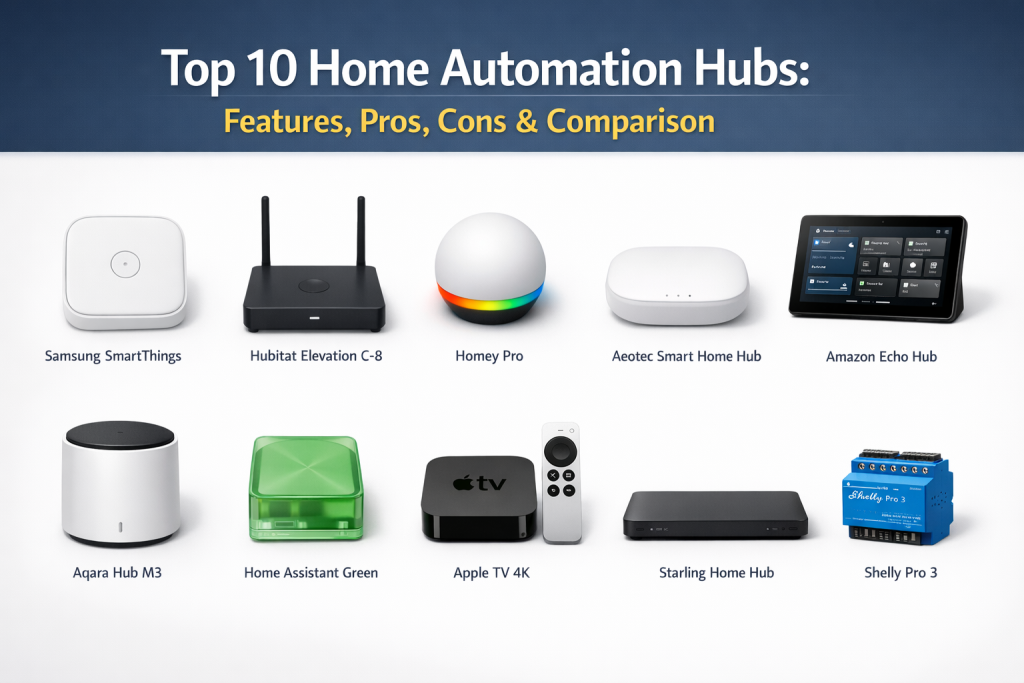
1.Samsung SmartThings Station
The SmartThings Station is a compact, affordable hub that doubles as a fast wireless charger while acting as a Matter-enabled command center.
Key Features
- Built-in Fast Charger: 15W wireless charging pad for mobile devices.
- Smart Button: A physical button on the hub that triggers custom routines.
- Matter Support: Fully certified as a Matter controller and Thread border router.
- Zigbee Integration: Connects to thousands of low-power sensors.
- SmartThings Find: Helps locate lost Galaxy phones and tags around the house.
Pros
- Excellent value for money given the dual-purpose design.
- Very small footprint that blends into home decor.
Cons
- Lacks a Z-Wave radio, limiting compatibility with older specialty sensors.
- No Ethernet port; relies entirely on Wi-Fi for its own connection.
Platforms / Deployment
- iOS / Android
- Hybrid
Security & Compliance
- Samsung Knox Security
- GDPR compliant
Integrations & Ecosystem
Deeply integrated with the Samsung Galaxy ecosystem and thousands of “Works with SmartThings” devices.
Support & Community
Extensive support from Samsung and a very large user base.
2.Hubitat Elevation C-8
The Hubitat Elevation C-8 is the ultimate hub for users who demand 100% local processing and high-end Z-Wave/Zigbee performance.
Key Features
- External Antennas: Provides superior range for large homes or multi-story buildings.
- Z-Wave 800 & Zigbee 3.0: Features the latest generation of wireless radios.
- Local Logic Engine: Every automation runs inside the box, not in the cloud.
- Ethernet Connection: Dedicated LAN port for maximum stability.
- Cloud Migration: Easily move your setup from an older Hubitat model to the C-8.
Pros
- Blazing fast response times due to zero cloud latency.
- Total privacy; your data never leaves the physical hub.
Cons
- The user interface is more technical and less “polished” than mainstream brands.
- Not recommended for beginners who want a plug-and-play experience.
Platforms / Deployment
- Web / iOS / Android
- Local
Security & Compliance
- Local-only data storage
- No mandatory cloud account
Integrations & Ecosystem
Supports a massive library of community-created drivers for virtually any device.
Support & Community
One of the most knowledgeable and helpful enthusiast communities in the industry.
3.Homey Pro
Homey Pro is a high-performance hub that boasts the most impressive array of radios, supporting eight different wireless technologies in one sleek puck.
Key Features
- 8 Wireless Technologies: Wi-Fi, Bluetooth, Zigbee, Z-Wave, 433MHz, 868MHz, Infrared, and Matter.
- Advanced Flow: A visual drag-and-drop tool for creating complex automations.
- Energy Monitoring: Detailed insights into every connected device’s power use.
- Local Processing: Automations run locally for speed and privacy.
- Satellite Mode: Use Homey Bridge units to extend coverage to other rooms.
Pros
- The “Swiss Army Knife” of hubs; it connects to almost anything.
- Beautifully designed mobile and web interfaces.
Cons
- One of the most expensive consumer hubs on the market.
- Some advanced features require a “Homey Premium” subscription.
Platforms / Deployment
- Web / iOS / Android
- Local / Hybrid
Security & Compliance
- ISO 27001
- GDPR compliant
Integrations & Ecosystem
Supports over 50,000 devices from more than 1,000 different brands.
Support & Community
Strong European presence with growing global support and documentation.
4.Aeotec Smart Home Hub
The Aeotec Smart Home Hub is the official successor to the original SmartThings hardware, offering a traditional hub experience for the SmartThings ecosystem.
Key Features
- Tri-Protocol Support: Includes Zigbee, Z-Wave, and Wi-Fi radios.
- Ethernet Port: Allows for a stable wired connection to your home network.
- SmartThings Compatible: Runs the full SmartThings software and automation suite.
- Compact Design: Small enough to be hidden behind furniture or on a shelf.
- USB Expansion: Potential for future hardware expansions.
Pros
- The best “all-rounder” for users who want Z-Wave support within SmartThings.
- Very stable and well-supported hardware by a veteran IoT manufacturer.
Cons
- Setup requires a cloud-based Samsung account.
- Still relies on the cloud for some advanced integrations and app features.
Platforms / Deployment
- iOS / Android
- Hybrid
Security & Compliance
- WPA3 support
- Secure boot technology
Integrations & Ecosystem
Works with everything in the SmartThings “Works With” database.
Support & Community
Standard consumer support backed by Aeotec’s technical engineering team.
5.Amazon Echo Hub
The Echo Hub is a wall-mountable smart home control panel that acts as both a visual interface and a powerful multi-protocol hub.
Key Features
- 8-inch Display: A persistent touch-screen for controlling the whole house.
- Built-in Radios: Support for Zigbee, Sidewalk, Thread, Bluetooth, and Matter.
- PoE Compatible: Can be powered via an Ethernet cable with an adapter.
- Customizable Widgets: Pin your most-used lights, cameras, and locks to the home screen.
- Proximity Sensor: Wakes up the screen as you approach the device.
Pros
- Excellent for families who need a central, physical place to control the home.
- Simplifies the Alexa experience into a dedicated “Control Center” view.
Cons
- Requires mounting to a wall or a dedicated stand (sold separately).
- Some users may find the ad-supported Alexa environment distracting.
Platforms / Deployment
- Proprietary OS / iOS / Android
- Cloud / Hybrid
Security & Compliance
- Physical camera shutter
- Microphone mute button
Integrations & Ecosystem
Native integration with Alexa-compatible devices and Ring security systems.
Support & Community
World-class customer support and a massive global user base.
6.Aqara Hub M3
The Aqara Hub M3 is an advanced controller that prioritizes local automation and acts as a Matter Bridge for the entire Aqara sensor lineup.
Key Features
- Matter Bridge: Brings all your Zigbee Aqara devices into Apple Home or Google Home.
- Infrared Control: Built-in 360-degree IR blaster to control TVs and AC units.
- Local Linkage: Automations between Aqara devices happen even without internet.
- Power Options: Can be powered via USB-C or PoE (Power over Ethernet).
- Dual-Band Wi-Fi: Supports both 2.4GHz and 5GHz networks for better stability.
Pros
- The most affordable way to add high-quality sensors to Apple HomeKit.
- PoE support is a rarity in hubs at this price point.
Cons
- Advanced features are mostly limited to Aqara’s own sensors and devices.
- The app can be complex due to the volume of settings.
Platforms / Deployment
- iOS / Android
- Local / Hybrid
Security & Compliance
- Apple HomeKit Certified
- WPA3 Security
Integrations & Ecosystem
Works exceptionally well with Apple Home, Alexa, and Google Home via Matter.
Support & Community
Rising star in the smart home community with strong social media support.
7.Home Assistant Green
Home Assistant Green is the official, “ready-to-use” hardware for the Home Assistant platform, designed for those who want power without the DIY setup.
Key Features
- Pre-installed Home Assistant: No need to flash SD cards or use a command line.
- Expandable: Add Zigbee or Z-Wave via USB “dongles” (like SkyConnect).
- Powerful Hardware: High-performance quad-core processor and 4GB of RAM.
- Privacy Focused: All data and processing stay on the local device.
- Energy Dashboard: Native support for monitoring whole-home energy use.
Pros
- The most powerful and flexible hub on this list.
- Open-source software ensures your hub will never be “discontinued” by a vendor.
Cons
- Requires additional USB sticks for Zigbee or Z-Wave support.
- Still has a learning curve compared to Amazon or Samsung.
Platforms / Deployment
- Web / iOS / Android
- Local
Security & Compliance
- No mandatory cloud or data collection
- Open-source transparency
Integrations & Ecosystem
Supports over 2,500 integrations—more than any other platform on earth.
Support & Community
Massive global community with thousands of tutorials and custom blueprints.
8.Apple TV 4K (128GB)
While primarily a streaming box, the 128GB Apple TV 4K includes a Thread radio and acts as the ultimate hub for the Apple Home ecosystem.
Key Features
- Thread Border Router: Essential for the new Matter standard.
- HomeKit Hub: Serves as the gateway for remote access to your Apple Home.
- A15 Bionic Chip: Far more powerful than any other dedicated smart home hub.
- Ethernet Port: (128GB model only) Ensures a rock-solid network connection.
- Silent Operation: Fanless design makes it perfect for the living room.
Pros
- You get a world-class 4K streaming device and a smart home hub in one.
- Effortless setup if you already own an iPhone or iPad.
Cons
- Only supports “HomeKit” or “Matter” certified devices.
- No native Zigbee or Z-Wave radios (requires third-party bridges).
Platforms / Deployment
- tvOS / iOS / iPadOS / macOS
- Local / Hybrid
Security & Compliance
- End-to-end encryption for all Home data
- Strict Apple privacy standards
Integrations & Ecosystem
Perfectly integrated with all Apple devices and services.
Support & Community
Standard Apple Care and a massive ecosystem of certified hardware.
9.Starling Home Hub
The Starling Home Hub is a specialized bridge that brings the entire Google Nest ecosystem into Apple Home (HomeKit) with near-native performance.
Key Features
- Nest to HomeKit Bridge: Makes Nest Cams, Thermostats, and Protects show up in Apple Home.
- Plug-and-Play: Zero configuration required; just connect it to your router.
- Real-time Sync: Changes in the Nest app reflect instantly in HomeKit.
- AirPlay Support: Enables AirPlay on Google Nest speakers and displays.
- Secure Local Link: Acts as a secure local middleman between the two clouds.
Pros
- The only reliable way to use Nest products seamlessly within the Apple ecosystem.
- Tiny, low-power device that requires no maintenance once set up.
Cons
- Extremely specialized; it only bridges Nest to HomeKit.
- Lacks Zigbee or Z-Wave for general smart home expansion.
Platforms / Deployment
- Web / iOS
- Local / Hybrid
Security & Compliance
- Local encryption
- Regular security updates
Integrations & Ecosystem
The bridge between the Google/Nest and Apple/HomeKit ecosystems.
Support & Community
Direct developer support and a very high satisfaction rating among niche users.
10.Shelly Pro 3
The Shelly Pro 3 is a DIN-rail mountable hub and switch designed for professional electrical panels to control high-voltage circuits.
Key Features
- DIN-Rail Mountable: Fits inside your home’s main electrical breaker box.
- 3-Channel Control: Direct control of three independent 16A electrical circuits.
- Wi-Fi, Bluetooth, & LAN: Multiple ways to connect to your home network.
- Scripting Support: Build custom logic directly on the device using mJS.
- Local API: Open API for easy integration with Home Assistant or Hubitat.
Pros
- The most professional and permanent way to automate “whole-home” circuits.
- Extremely reliable and designed for industrial-grade durability.
Cons
- Requires professional installation by a licensed electrician.
- Not a “hub” in the sense of connecting wireless Zigbee sensors.
Platforms / Deployment
- Web / iOS / Android
- Local
Security & Compliance
- TLS support
- Local authentication
Integrations & Ecosystem
Works with MQTT, Home Assistant, and any system that can send HTTP requests.
Support & Community
Strong professional community and detailed technical documentation for installers.
Comparison Table (Top 10)
| Tool Name | Best For | Platform(s) Supported | Deployment | Standout Feature | Public Rating |
|---|---|---|---|---|---|
| Samsung SmartThings Station | Value & Charging | iOS, Android | Hybrid | 15W Wireless Charger | N/A |
| Hubitat Elevation C-8 | Local Enthusiasts | Web, iOS, Android | Local | External Antennas | N/A |
| Homey Pro | Maximum Connectivity | Web, iOS, Android | Hybrid | 8 Wireless Radios | N/A |
| Aeotec Smart Home Hub | Stable SmartThings | iOS, Android | Hybrid | Z-Wave & Zigbee Mesh | N/A |
| Amazon Echo Hub | Visual Wall Control | Proprietary, Mobile | Hybrid | 8-inch Touch Screen | N/A |
| Aqara Hub M3 | Apple Home Users | iOS, Android | Hybrid | PoE & Matter Bridge | N/A |
| Home Assistant Green | Open Source Power | Web, iOS, Android | Local | Pre-installed OS | N/A |
| Apple TV 4K (128GB) | Apple Ecosystem | tvOS, iOS | Hybrid | Thread Border Router | N/A |
| Starling Home Hub | Nest to HomeKit | Web, iOS | Hybrid | Native Nest Integration | N/A |
| Shelly Pro 3 | Electrical Panels | Web, iOS, Android | Local | DIN-Rail Mountable | N/A |
Evaluation & Scoring of Home Automation Hubs
| Tool Name | Core (25%) | Ease (15%) | Integrations (15%) | Security (10%) | Performance (10%) | Support (10%) | Value (15%) | Weighted Total |
|---|---|---|---|---|---|---|---|---|
| Samsung SmartThings Station | 8 | 10 | 9 | 8 | 8 | 9 | 10 | 8.65 |
| Hubitat Elevation C-8 | 10 | 5 | 9 | 10 | 10 | 8 | 9 | 8.60 |
| Homey Pro | 10 | 9 | 10 | 9 | 10 | 8 | 6 | 8.85 |
| Aeotec Smart Home Hub | 9 | 8 | 9 | 8 | 8 | 9 | 9 | 8.55 |
| Amazon Echo Hub | 8 | 9 | 8 | 7 | 8 | 10 | 8 | 8.30 |
| Aqara Hub M3 | 8 | 8 | 8 | 9 | 9 | 8 | 9 | 8.30 |
| Home Assistant Green | 10 | 4 | 10 | 10 | 10 | 10 | 10 | 8.60 |
| Apple TV 4K (128GB) | 7 | 10 | 7 | 10 | 10 | 10 | 8 | 8.45 |
| Starling Home Hub | 6 | 10 | 6 | 9 | 10 | 9 | 8 | 7.85 |
| Shelly Pro 3 | 9 | 6 | 9 | 9 | 10 | 8 | 8 | 8.25 |
How to interpret these scores: Scores are based on the hub’s versatility as a central controller. Homey Pro receives the highest score for its unrivaled radio compatibility and ease of use. Hubitat and Home Assistant Green score perfectly in “Core” power and “Security” due to their local-only nature, though they lose points in “Ease” for the average consumer. Samsung and Apple lead in “Ease” and “Value” for users already invested in their respective ecosystems.
Which Home Automation Hubs Tool Is Right for You?
Solo / Freelancer
If you are living in a small apartment or are a renter, the Samsung SmartThings Station is the ideal choice. It is affordable, takes up almost no space on a nightstand, and doubles as a charger for your phone, making it a functional addition rather than just another piece of “tech clutter.”
SMB
For small office owners or shop managers, the Aqara Hub M3 or Aeotec Smart Home Hub are excellent choices. They are stable, support a wide range of security sensors (door, window, leak), and can be easily managed via a smartphone app without needing a dedicated IT staff.
Mid-Market
Tech-savvy homeowners with multi-story houses should prioritize the Hubitat Elevation C-8. Its external antennas and 800-series Z-Wave radio ensure that your smart home network remains strong and responsive across the entire property without relying on the cloud.
Enterprise
For luxury estates or large-scale managed properties, the Homey Pro or a combination of Shelly Pro 3 units is the professional choice. These systems offer the highest level of integration and the ability to control high-voltage electrical circuits directly from the breaker panel.
Budget vs Premium
- Budget: Samsung SmartThings Station and Aqara Hub M3 provide the best features-to-price ratio for beginners.
- Premium: Homey Pro and Control4 (professional) represent the premium end where you pay for extreme compatibility and refined software.
Feature Depth vs Ease of Use
- Feature Depth: Home Assistant Green is the deepest hub, allowing for nearly infinite customization and data tracking for those who want to “tinker.”
- Ease of Use: Apple TV 4K and Amazon Echo Hub are designed to be set up and used by anyone in the family with almost zero learning curve.
Integrations & Scalability Needs
If you have a massive collection of “random” smart devices from various eras, Homey Pro is the only hub that will likely connect to all of them. For those who want to grow their home slowly over time, the Aeotec Smart Home Hub provides a very stable path forward.
Security & Compliance Needs
Users who are extremely concerned about privacy and data leaks should only consider “Local First” hubs like Hubitat Elevation C-8 or Home Assistant Green. These hubs ensure that your home’s activity logs never leave your physical house.
Frequently Asked Questions (FAQs)
What is the difference between a Hub and a Bridge?
A hub usually connects multiple brands and protocols (Zigbee, Z-Wave), while a bridge typically only connects one brand’s devices (like Philips Hue) to your Wi-Fi network.
Does my smart home stop working if the internet goes down?
If you have a local-processing hub like Hubitat or Home Assistant, your lights and sensors will work perfectly. If you have a cloud-dependent hub, your automations may stop.
Can I have more than one hub in my house?
Yes, many people use a “primary” hub like Apple TV for the interface and a “radio” hub like Aqara or Hubitat to manage the specific Zigbee/Z-Wave devices.
What is Z-Wave?
Z-Wave is a low-power wireless frequency designed specifically for smart homes. It does not interfere with your Wi-Fi and creates a “mesh” where every device strengthens the network.
What is Zigbee?
Zigbee is similar to Z-Wave but operates on the 2.4GHz frequency. It is very common in smart bulbs and sensors from brands like IKEA, Philips, and Aqara.
Do I need an Ethernet port on my hub?
While Wi-Fi works, an Ethernet port is highly recommended for your hub to ensure the fastest possible communication with your phone and the internet.
Is Matter the same as a hub?
No, Matter is a “language” that devices speak. You still need a Matter-compatible hub (called a Controller) to manage and talk to those devices.
How many devices can one hub handle?
Most modern hubs like Hubitat or SmartThings can handle over 200 devices, though performance may vary based on the number of complex automations running.
Can a hub control my TV and Air Conditioner?
Only if the hub has an “Infrared (IR) Blaster” (like the Aqara M3 or Homey Pro) or if the appliances are already smart-enabled via Wi-Fi.
Is it hard to set up a smart home hub?
Mainstream hubs like Samsung and Amazon take about 5 minutes to set up. Professional or enthusiast hubs like Home Assistant can take several hours to fully configure.
Conclusion
The selection of a home automation hub is the single most important hardware decision for any connected property. By choosing a hub that supports multiple protocols and local processing, you ensure that your home is both future-proof and resilient to internet outages. A good hub acts as an invisible orchestra conductor, making sure your lights, locks, and sensors work together in perfect harmony. As universal standards like Matter and Thread continue to mature, the physical hub remains the essential bridge for existing and legacy hardware. Ultimately, the right choice depends on your willingness to technical “tinker” versus your desire for a simple, plug-and-play experience. Investing in a quality hub today prevents the frustration of a fragmented, slow, and unreliable smart home tomorrow.

Best Cardiac Hospitals Near You
Discover top heart hospitals, cardiology centers & cardiac care services by city.
Advanced Heart Care • Trusted Hospitals • Expert Teams
View Best Hospitals