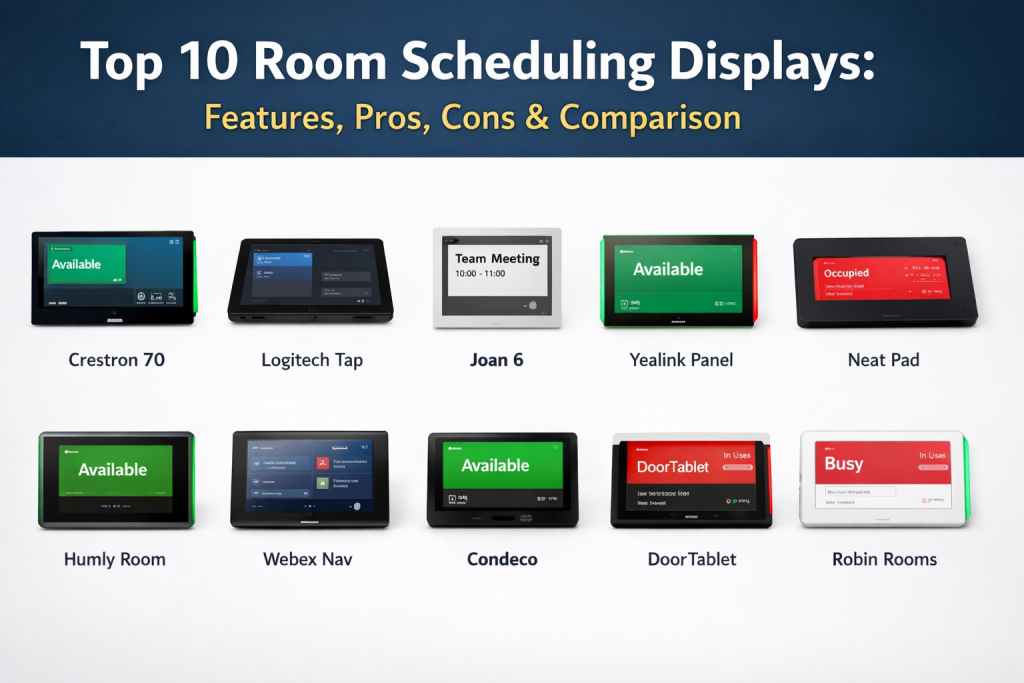
Introduction
Room scheduling displays are dedicated hardware devices or tablet-based interfaces mounted outside meeting rooms and collaborative spaces to manage real-time occupancy. These devices integrate directly with enterprise calendar systems to show current availability, upcoming bookings, and allow for on-the-spot reservations. In the current workspace environment, these displays have evolved into critical infrastructure for hybrid offices, helping to eliminate “ghost meetings” and reducing the friction of finding available space in high-density environments.
The modern workplace relies on visibility and data-driven insights to optimize real estate footprints. Room scheduling displays provide the physical touchpoint for these insights, often incorporating LED status lights—typically green for available and red for occupied—to provide instant visual cues across an office floor. Beyond simple booking, these devices now often feature integrated sensors for automatic check-ins and touchless interactions. For buyers, the focus remains on ease of deployment, centralized management, and the ability to withstand the rigors of continuous public use in a professional setting.
Best for: Corporate offices, co-working spaces, educational institutions, and healthcare facilities that manage a high volume of shared meeting rooms.
Not ideal for: Small offices with only one or two meeting spaces where manual coordination or basic calendar invites are sufficient without physical hardware.
Key Trends in Room Scheduling Displays
- Power over Ethernet (PoE) Standardization: The industry has moved toward PoE as the primary power and data source, simplifying installation by requiring only a single cable run to each door.
- Integrated Occupancy Sensors: Displays are increasingly featuring built-in PIR or ultrasonic sensors that automatically release a room if no one shows up, optimizing space utilization.
- Sustainable E-Ink Options: For locations where wiring is difficult, ultra-low-power electronic paper displays are becoming a popular wireless alternative with multi-year battery life.
- Touchless Check-in via Mobile: To improve hygiene and speed, many displays now allow users to claim a room by scanning a QR code with their mobile device rather than touching the screen.
- Centralized Management Hubs: Facilities managers now expect cloud-based dashboards to monitor device health, push firmware updates, and analyze room usage patterns across global offices.
- Universal Platform Compatibility: Modern hardware is increasingly “platform-agnostic,” allowing the same device to run specialized software for various calendar ecosystems.
How We Selected These Tools (Methodology)
- Hardware Durability: We prioritized devices designed specifically for 24/7 commercial use rather than consumer-grade tablets.
- Ecosystem Integration: Selection was based on how seamlessly the hardware connects with major platforms like Microsoft 365 and Google Workspace.
- Visual Communication: We evaluated the effectiveness of status indicators, such as side-mounted LED bars that are visible from a distance.
- Deployment Flexibility: We looked for tools that offer diverse mounting options, including glass, brick, and drywall kits.
- Security Architecture: We assessed features like hidden cable management, locked-down kiosk modes, and encrypted data transmission.
- Management Features: The ability for IT teams to remotely troubleshoot and update devices was a key requirement for this list.
Top 10 Room Scheduling Displays
1. Crestron 70 Series
Crestron is a leader in high-end enterprise automation. Their scheduling panels are designed for the most demanding corporate environments, offering deep integration with the broader Crestron ecosystem and enterprise-grade security.
Key Features
- High-resolution touchscreens with integrated light bars.
- Native support for Microsoft Teams and Zoom Rooms.
- Proximity sensors that wake the screen upon approach.
- RFID/NFC support for secure employee check-ins.
- PoE+ connectivity for simplified single-cable installation.
Pros
- Incredible build quality and long-term reliability.
- Deepest customization options for enterprise branding.
Cons
- Premium pricing tier suited for large budgets.
- Often requires a certified integrator for complex setups.
Platforms / Deployment
- Windows / Proprietary OS
- PoE / Ethernet
Security & Compliance
- 802.1X, TLS, and Active Directory integration.
- Enterprise-grade encryption for all communications.
Integrations & Ecosystem
Built to work within a wider building management system.
- Microsoft Teams
- Zoom
- Appspace
- 22Miles
Support & Community
Extensive global partner network and 24/7 technical support for enterprise clients.
2. Logitech Tap Scheduler
Logitech Tap Scheduler is a purpose-built scheduling panel that balances sleek design with ease of use. It is part of the Logitech Room Solutions family, making it a natural choice for offices already using Logitech video bars.
Key Features
- Clean, low-profile design with integrated cable management.
- Green/Red status lights visible from the side.
- Included mounts for glass, mullions, and walls.
- Multiple orientation options (portrait or landscape).
- One-click join functionality for scheduled meetings.
Pros
- Very simple to deploy and manage via Logitech Sync.
- Aesthetically pleasing and fits modern office decor.
Cons
- Limited to specific partner software providers.
- Fewer hardware customization options than Crestron.
Platforms / Deployment
- Android-based
- PoE
Security & Compliance
- Secure boot and encrypted storage.
- Standard enterprise network protocols.
Integrations & Ecosystem
Strongest with the most popular meeting platforms.
- Microsoft Teams
- Zoom Rooms
- Robin
- Meetio
Support & Community
Wide retail availability and robust online documentation with standard business support.
3. Joan 6 / Joan 6 Pro
Joan is famous for its sustainable approach, utilizing e-paper technology. This makes it the premier choice for offices where running new power cables to every door is physically or financially impossible.
Key Features
- Ultra-low-power e-ink display with zero glare.
- Months of battery life on a single charge.
- Completely wireless installation via magnetic mounts.
- Smart energy-saving modes for non-office hours.
- E-ink screen remains readable in bright sunlight.
Pros
- Easiest installation process in the industry.
- Environmentally friendly and energy-efficient.
Cons
- No color display (black and white only).
- Screen refresh rates are slower than traditional LCDs.
Platforms / Deployment
- Web-based Management
- Wi-Fi / Battery
Security & Compliance
- WPA2-Enterprise Wi-Fi support.
- Encrypted data sync with calendars.
Integrations & Ecosystem
Works with all major enterprise calendar systems.
- Google Workspace
- Microsoft 365
- Slack
- iCalendar
Support & Community
Good online support library and a focus on sustainable office technology.
4. Yealink RoomPanel
Yealink offers a high-performance, cost-effective scheduling panel that is frequently bundled with their video conferencing hardware. It is known for its bright display and highly visible status indicators.
Key Features
- 8-inch multi-point touch display.
- Full-range programmable RGB LED bars.
- Built-in Wi-Fi and Bluetooth for flexible connectivity.
- Integrated RFID/NFC for identity-based booking.
- Ambient light and proximity sensors.
Pros
- Excellent value for the feature set provided.
- Highly visible status lights even in bright hallways.
Cons
- Management software is best suited for Yealink environments.
- Limited third-party mounting accessories.
Platforms / Deployment
- Android-based
- PoE / Wi-Fi
Security & Compliance
- Standard enterprise Wi-Fi and Ethernet security.
- Password-protected settings menu.
Integrations & Ecosystem
Primary focus on Microsoft and Zoom ecosystems.
- Microsoft Teams
- Zoom Rooms
- Yealink Management Cloud Service
Support & Community
Strong global distribution and standard technical support tiers.
5. Neat Pad
Neat Pad is a sleek, minimalist touchscreen that serves dual purposes: either as a controller inside the room or a scheduling display outside the room. Its elegant design won multiple awards for industrial aesthetics.
Key Features
- Ultra-slim profile that blends into the wall.
- Two integrated microphones for future-use cases.
- PoE connectivity with minimal cabling visibility.
- Seamless setup with Neat video conferencing hardware.
- High-contrast display for easy readability.
Pros
- Exquisite industrial design.
- Dual-purpose hardware reduces inventory complexity.
Cons
- Proprietary hardware locked into the Neat ecosystem.
- Higher price point for a dedicated scheduler.
Platforms / Deployment
- Neat OS
- PoE
Security & Compliance
- Locked-down secure operating system.
- Standard encrypted network communication.
Integrations & Ecosystem
Strictly focused on the leading video platforms.
- Zoom Rooms
- Microsoft Teams
Support & Community
High-quality direct support and a premium user experience.
6. Humly Room Display
Humly is a specialized Swedish brand that focuses exclusively on the user experience of workplace branding and booking. Their display is designed to be “distraction-free” and aesthetically timeless.
Key Features
- Iconic circular LED light ring for status.
- Designed to minimize visual clutter in the office.
- Open API for custom integrations and branding.
- Scalable management for thousands of units.
- High-quality hardware with a premium architectural feel.
Pros
- Unique design that stands out from “tablet-style” boxes.
- Focus on privacy and non-distractive workplace design.
Cons
- Fewer third-party software integrations than competitors.
- Primarily available through specialized AV channels.
Platforms / Deployment
- Linux-based
- PoE / Wi-Fi
Security & Compliance
- Enterprise-grade security and authentication.
- Privacy-focused data handling.
Integrations & Ecosystem
Flexible for custom workplace environments.
- Microsoft 365
- Google Workspace
- Exchange
- Various Workplace Apps
Support & Community
Specialized European support with a growing global presence.
7. Appspace on Cisco Webex Navigator
Cisco’s Webex Navigator is a premium touch panel often paired with Appspace software to provide a comprehensive digital signage and room booking solution.
Key Features
- High-end industrial design with wall and table mounts.
- Integrated sensors for temperature and humidity.
- Appspace integration for corporate communications.
- Visible status indicators and clear typography.
- PoE for reliable power and data connectivity.
Pros
- Exceptional reliability in massive enterprise deployments.
- Can double as a corporate messaging board via Appspace.
Cons
- Expensive hardware and software combination.
- Requires significant IT configuration for full features.
Platforms / Deployment
- Cisco RoomOS / Android
- PoE
Security & Compliance
- Military-grade security and compliance features.
- Deep integration with Cisco Control Hub.
Integrations & Ecosystem
Built for the Cisco and Appspace ecosystems.
- Webex
- Microsoft Teams
- Appspace
- Control Hub
Support & Community
World-class enterprise support and extensive global coverage.
8. Condeco (by Eptura)
Condeco provides specialized room booking hardware that is part of a larger workplace management suite. It is designed for global companies that need deep analytics on room usage.
Key Features
- Integrated RFID for touchless room claiming.
- Daily schedule view directly on the screen.
- Red/Amber/Green status lights for availability.
- Cloud-based management for global device fleets.
- Hardware optimized for 24/7 reliability.
Pros
- Part of a comprehensive workplace management platform.
- Excellent analytics for optimizing office space.
Cons
- Hardware is best used within the Condeco software ecosystem.
- Interface can feel more “utilitarian” than “lifestyle.”
Platforms / Deployment
- Proprietary
- PoE / Wi-Fi
Security & Compliance
- SSO, SAML, and high-level encryption.
- SOC 2 and ISO compliance.
Integrations & Ecosystem
Focuses on the corporate office stack.
- Microsoft Outlook
- Google Calendar
- Microsoft Teams
Support & Community
Strong enterprise support with a focus on facility management.
9. DoorTablet
DoorTablet is a highly flexible software-first solution that runs on a variety of dedicated hardware panels. It is known for its extreme customization and ability to handle complex room logic.
Key Features
- Supports a wide range of hardware sizes (from 7 to 20 inches).
- Deeply customizable branding and layouts.
- Support for wayfinding and floor plans.
- Integrated room control (lighting and climate).
- Automatic check-in and release functionality.
Pros
- Most flexible software for unique layouts.
- Capable of managing more than just room bookings.
Cons
- UI can become cluttered if not managed carefully.
- Setup can be more complex due to the number of options.
Platforms / Deployment
- Android / iOS / Windows
- PoE / Wi-Fi
Security & Compliance
- Standard network security protocols.
- Encrypted calendar synchronization.
Integrations & Ecosystem
Works with almost any calendar or backend.
- Microsoft 365
- Google Workspace
- IBM Notes
- SQL databases
Support & Community
Active direct support and a focus on bespoke workplace solutions.
10. Robin Rooms
Robin provides a software-first approach that often utilizes consumer tablets (like iPads) in rugged enclosures, though they also support professional-grade hardware for a more permanent feel.
Key Features
- Highly intuitive user interface that anyone can use.
- Interactive floor plans for easier wayfinding.
- Detailed analytics on room “no-shows.”
- Status colors that change based on room density.
- Easy remote management for IT teams.
Pros
- One of the best user interfaces in the market.
- Very fast to set up and train employees.
Cons
- Consumer tablets require high-quality enclosures to feel “pro.”
- Battery bloat can be an issue if using iPads without PoE adapters.
Platforms / Deployment
- iOS / Android
- Wi-Fi / PoE
Security & Compliance
- SSO and encrypted data storage.
- Regular security audits and compliance.
Integrations & Ecosystem
Modern and well-connected to the tech stack.
- Slack
- Microsoft Teams
- Google Workspace
- Zoom
Support & Community
Excellent customer success teams and high ratings for ease of use.
Comparison Table
| Tool Name | Best For | Platform(s) Supported | Deployment | Standout Feature | Public Rating |
| 1. Crestron 70 | Large Enterprise | Proprietary OS | PoE | Proximity Sensors | N/A |
| 2. Logitech Tap | Design-led offices | Android | PoE | Clean Cable Mgmt | N/A |
| 3. Joan 6 | No-wiring zones | Web-based | Wi-Fi/Battery | E-Ink Display | N/A |
| 4. Yealink Panel | Value for money | Android | PoE/Wi-Fi | RFID/NFC Reader | N/A |
| 5. Neat Pad | Minimalist UI | Neat OS | PoE | Dual-Purpose Use | N/A |
| 6. Humly Room | Architectural | Linux | PoE/Wi-Fi | Light Ring Design | N/A |
| 7. Webex Nav | Cisco Ecosystem | RoomOS | PoE | Environmental Sensors | N/A |
| 8. Condeco | Space Analytics | Proprietary | PoE/Wi-Fi | Touchless RFID | N/A |
| 9. DoorTablet | Custom Layouts | Android/Win | PoE/Wi-Fi | Wayfinding Support | N/A |
| 10. Robin Rooms | Ease of Use | iOS/Android | Wi-Fi/PoE | Floor Plan View | N/A |
Evaluation & Scoring of Room Scheduling Displays
| Tool Name | Core (25%) | Ease (15%) | Integrations (15%) | Security (10%) | Performance (10%) | Support (10%) | Value (15%) | Weighted Total |
| 1. Crestron | 10 | 5 | 10 | 10 | 10 | 9 | 6 | 8.60 |
| 2. Logitech | 8 | 9 | 9 | 8 | 9 | 8 | 8 | 8.35 |
| 3. Joan | 6 | 10 | 9 | 7 | 7 | 8 | 9 | 7.80 |
| 4. Yealink | 8 | 8 | 8 | 8 | 8 | 8 | 10 | 8.30 |
| 5. Neat Pad | 7 | 9 | 7 | 9 | 9 | 8 | 7 | 7.75 |
| 6. Humly | 8 | 8 | 8 | 9 | 8 | 8 | 7 | 7.85 |
| 7. Webex Nav | 9 | 6 | 9 | 10 | 10 | 9 | 6 | 8.25 |
| 8. Condeco | 9 | 7 | 9 | 9 | 8 | 9 | 7 | 8.30 |
| 9. DoorTablet | 9 | 6 | 10 | 8 | 8 | 8 | 8 | 8.15 |
| 10. Robin | 7 | 10 | 9 | 8 | 8 | 9 | 8 | 8.30 |
This scoring framework evaluates hardware based on its fitness for long-term corporate deployment. While Joan leads in ease of installation, Crestron and Cisco maintain dominance in core performance and security for high-security environments. Value-driven options like Yealink and Logitech represent the best balance for the average modern office.
Which Room Scheduling Display Tool Is Right for You?
Solo / Freelancer
For individuals or very small teams, physical displays are rarely necessary. A shared digital calendar is typically enough to prevent booking conflicts.
SMB
Small businesses should look at Joan for its ease of installation or Yealink for its high feature-to-price ratio. These tools allow for professional room management without the need for extensive wiring.
Mid-Market
Logitech Tap Scheduler and Robin Rooms offer the best user experience for a growing workforce. They are easy to scale and provide the analytics needed to understand how the office is being used.
Enterprise
Large corporations with high security and management needs should standardize on Crestron 70 Series or Cisco Webex Navigator. These devices are built to be managed in the thousands from a single location.
Budget vs Premium
Joan and Yealink represent the best “budget” entry points, while Crestron and Neat are the premium choices for those prioritizing design and deep ecosystem integration.
Feature Depth vs Ease of Use
DoorTablet offers the most feature depth and customization, while Neat Pad and Robin focus on extreme ease of use and minimalist design.
Integrations & Scalability
Logitech and Crestron offer the best integration into the wider world of AV and meeting room technology, ensuring that your door displays work in harmony with your cameras and speakers.
Security & Compliance Needs
For government or financial institutions, Cisco and Crestron provide the most robust security protocols, including advanced encryption and physical security features to prevent tampering.
Frequently Asked Questions
What is a room scheduling display?
It is a small tablet or screen mounted outside a meeting room that shows the current status and upcoming schedule of the room.
How are these displays powered?
Most professional displays use Power over Ethernet (PoE), while some wireless options like Joan use internal batteries.
Can I use a regular iPad for this?
Yes, but you will need a commercial enclosure and a way to provide constant power, as consumer batteries can swell if left plugged in 24/7.
Do these work with Outlook and Google Calendar?
Yes, almost all modern scheduling displays sync directly with Microsoft 365 and Google Workspace.
What happens if no one shows up for a meeting?
Many displays can be configured to “release” the room if a check-in isn’t performed within a certain timeframe (e.g., 10 minutes).
Are these displays visible from a distance?
Yes, most include side-mounted LED bars that shine red or green so you can see room status from down the hall.
Do I need a display for every room?
While not mandatory, having them on all shared spaces ensures a consistent experience and better data for your facility managers.
Can users book a room directly on the screen?
Yes, most models allow “ad-hoc” bookings directly from the touch interface if the room is currently free.
What is PoE?
Power over Ethernet allows a single cable to provide both the network connection and the electricity needed to run the device.
Do these displays provide usage analytics?
Yes, the management software typically tracks how often rooms are used, peak times, and common “no-show” rates.
Conclusion
Implementing a room scheduling display system is one of the most visible and impactful ways to modernize an office environment. By providing clear, real-time information at the point of need, these devices eliminate the frustration of meeting room conflicts and help teams collaborate more effectively. The choice between a high-end integrated system like Crestron and a flexible, wireless solution like Joan depends entirely on your existing infrastructure and long-term facility goals. To get started, evaluate the wiring capabilities of your current office and select a pilot room to test the integration with your existing calendar platform before committing to a full floor rollout.

Best Cardiac Hospitals Near You
Discover top heart hospitals, cardiology centers & cardiac care services by city.
Advanced Heart Care • Trusted Hospitals • Expert Teams
View Best Hospitals