Best Cosmetic Hospitals Near You

Compare top cosmetic hospitals, aesthetic clinics & beauty treatments by city.

Trusted • Verified • Best-in-Class Care

Explore Best Hospitals

How to Make a Git Repository Clone Go Into a Particular Folder

Step 1:

Let’s start by opening your terminal. If you’re using a Mac, it’s located in the Applications folder’s Utilities folder. You can launch Git Bash or the Command Prompt if you’re using Windows.
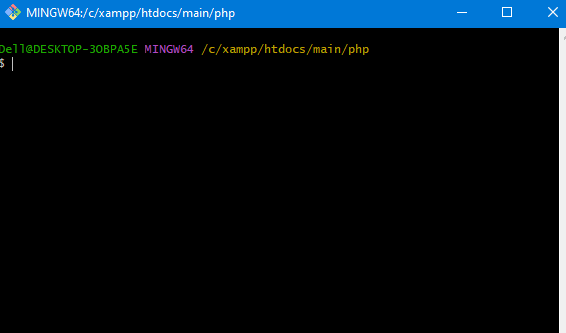
Step 2: Locate the Folder of Your Choice

Open your terminal and find the folder you wish to clone the Git repository from. To go to the target folder, run the cd command and then the directory path. For instance, you would use the following command to clone the repository into a folder named “my-project”:

cd /path/to/my-project
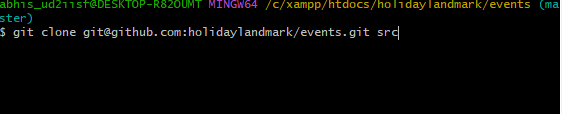
Step 3: Make a Git Repository Clone
It’s time to clone the Git repository now that you’re in the correct folder. You will need the repository’s URL in order to accomplish this. In most cases, the repository’s page on GitHub or another Git hosting service will provide the URL if you don’t have it.

Use the git clone command and the repository URL to clone the repository. For instance:
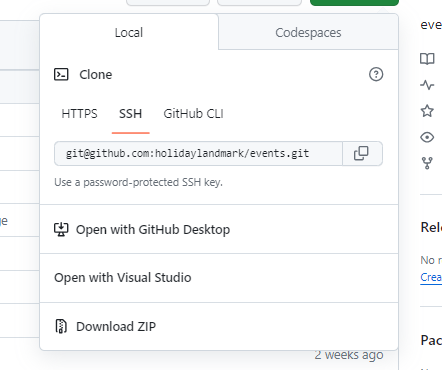
git clone git@github.com:holidaylandmark/events.git folder_name

Best Cardiac Hospitals Near You

Discover top heart hospitals, cardiology centers & cardiac care services by city.

Advanced Heart Care • Trusted Hospitals • Expert Teams

View Best Hospitals
<p data-start="140" data-end="435">I’m Abhishek, a DevOps, SRE, DevSecOps, and Cloud expert with a passion for sharing knowledge and real-world experiences. I’ve had the opportunity to work with <a class="decorated-link" href="https://www.cotocus.com/" target="_new" rel="noopener" data-start="300" data-end="335">Cotocus</a> and continue to contribute to multiple platforms where I share insights across different domains:</p> <ul data-start="437" data-end="922"> <li data-start="437" data-end="514"> <p data-start="439" data-end="514"><a class="decorated-link" href="https://www.devopsschool.com/" target="_new" rel="noopener" data-start="439" data-end="485">DevOps School</a> – Tech blogs and tutorials</p> </li> <li data-start="515" data-end="599"> <p data-start="517" data-end="599"><a class="decorated-link" href="https://www.holidaylandmark.com/" target="_new" rel="noopener" data-start="517" data-end="569">Holiday Landmark</a> – Travel stories and guides</p> </li> <li data-start="600" data-end="684"> <p data-start="602" data-end="684"><a class="decorated-link" href="https://www.stocksmantra.in/" target="_new" rel="noopener" data-start="602" data-end="647">Stocks Mantra</a> – Stock market strategies and tips</p> </li> <li data-start="685" data-end="764"> <p data-start="687" data-end="764"><a class="decorated-link" href="https://www.mymedicplus.com/" target="_new" rel="noopener" data-start="687" data-end="732">My Medic Plus</a> – Health and fitness guidance</p> </li> <li data-start="765" data-end="841"> <p data-start="767" data-end="841"><a class="decorated-link" href="https://www.truereviewnow.com/" target="_new" rel="noopener" data-start="767" data-end="814">TrueReviewNow</a> – Honest product reviews</p> </li> <li data-start="842" data-end="922"> <p data-start="844" data-end="922"><a class="decorated-link" href="https://www.wizbrand.com/" target="_new" rel="noopener" data-start="844" data-end="881">Wizbrand</a> – SEO and digital tools for businesses</p> </li> </ul> <p data-start="924" data-end="1021">I’m also exploring the fascinating world of <a class="decorated-link" href="https://www.quantumuting.com/" target="_new" rel="noopener" data-start="968" data-end="1018">Quantum Computing</a>.</p>

Related Posts

How to Fix “unable to start ssh-agent service, error: 1058” and “‘eval’ is not recognized” on Windows

How to Fix “unable to start ssh-agent service, error: 1058” and “‘eval’ is not recognized” on Windows When working with SSH keys on Windows, you may encounter…

Read More

reset your commit in GitHub

Here are some ways to reset your commit in GitHub: Run the following command in your terminal: This will undo the last commit and keep the changes…

Read More

Resolving Git ‘Detected Dubious Ownership’ Error with Safe Directory Configuration

Error: Solution: The error message indicates that Git detected dubious ownership in the repository at /opt/lampp/htdocs/holidaylandmark/events. This happens when Git thinks there’s a potential security issue with…

Read More

How to Set Up Your Email and Username for Git

How to Set Up Your Email and Username for Git Setting up your email and username is one of the first steps you need to take when…

Read More
0 0 votes
Article Rating
Subscribe
Notify of
guest
0 Comments
Oldest
Newest Most Voted
Inline Feedbacks
View all comments
0
Would love your thoughts, please comment.x
()
x