
Best Cosmetic Hospitals Near You

Compare top cosmetic hospitals, aesthetic clinics & beauty treatments by city.

Trusted • Verified • Best-in-Class Care

Explore Best Hospitals

How to Resolve “netstat: command not found” Error When Restarting XAMPP on Linux

Introduction

While working with XAMPP on Linux, you might encounter the following error message when trying to restart the XAMPP services:

/opt/lampp/share/xampp/xampplib: line 22: netstat: command not found

This error occurs because the netstat command, which is part of the net-tools package, is not installed on your system. This tutorial will guide you through resolving this error by installing the necessary tools.

Error Message

Here is the complete error message you might see:
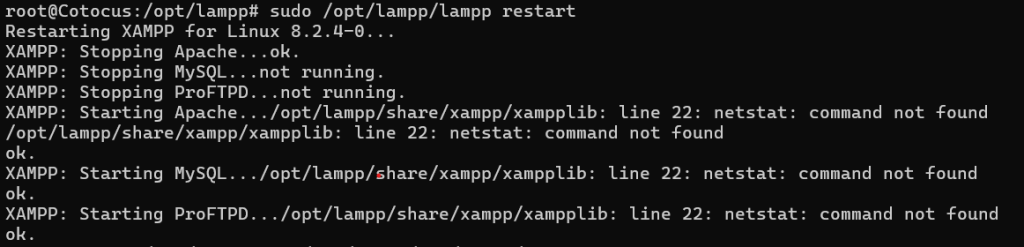
Restarting XAMPP for Linux 8.2.4-0...
XAMPP: Stopping Apache...ok.
XAMPP: Stopping MySQL...ok.
XAMPP: Stopping ProFTPD...ok.
XAMPP: Starting Apache.../opt/lampp/share/xampp/xampplib: line 22: netstat: command not found
/opt/lampp/share/xampp/xampplib: line 22: netstat: command not found
ok.
XAMPP: Starting MySQL.../opt/lampp/share/xampp/xampplib: line 22: netstat: command not found
ok.
XAMPP: Starting ProFTPD.../opt/lampp/share/xampp/xampplib: line 22: netstat: command not found
ok.

Solution

To resolve this issue, follow these steps:

Step 1: Update Package List

First, update your package list to ensure you have the latest information on available packages:

sudo apt-get update

Step 2: Install net-tools

The netstat command is part of the net-tools package. Install it using the following command:

sudo apt-get install net-tools

Step 3: Verify Installation

To confirm that netstat has been installed correctly, run:

netstat -version

You should see the version information for netstat, indicating that it is now available on your system.

Step 4: Restart XAMPP

After installing net-tools, restart XAMPP to ensure that the error is resolved:

sudo /opt/lampp/lampp restart

You should see output similar to the following, without the netstat: command not found error:
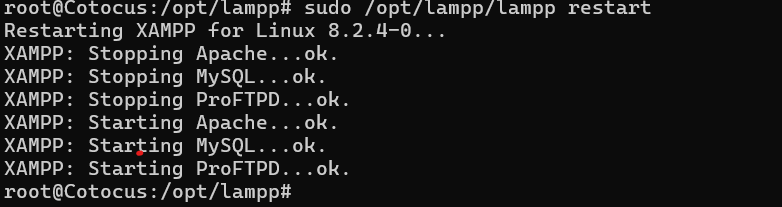
Restarting XAMPP for Linux 8.2.4-0...
XAMPP: Stopping Apache...ok.
XAMPP: Stopping MySQL...ok.
XAMPP: Stopping ProFTPD...ok.
XAMPP: Starting Apache...ok.
XAMPP: Starting MySQL...ok.
XAMPP: Starting ProFTPD...ok.

Conclusion

By following these steps, you can resolve the netstat: command not found error when restarting XAMPP on Linux. Installing the net-tools package provides the necessary netstat command, ensuring that XAMPP can function correctly without any issues.


Best Cardiac Hospitals Near You

Discover top heart hospitals, cardiology centers & cardiac care services by city.

Advanced Heart Care • Trusted Hospitals • Expert Teams

View Best Hospitals


<p data-start="140" data-end="435">I’m Abhishek, a DevOps, SRE, DevSecOps, and Cloud expert with a passion for sharing knowledge and real-world experiences. I’ve had the opportunity to work with <a class="decorated-link" href="https://www.cotocus.com/" target="_new" rel="noopener" data-start="300" data-end="335">Cotocus</a> and continue to contribute to multiple platforms where I share insights across different domains:</p> <ul data-start="437" data-end="922"> <li data-start="437" data-end="514"> <p data-start="439" data-end="514"><a class="decorated-link" href="https://www.devopsschool.com/" target="_new" rel="noopener" data-start="439" data-end="485">DevOps School</a> – Tech blogs and tutorials</p> </li> <li data-start="515" data-end="599"> <p data-start="517" data-end="599"><a class="decorated-link" href="https://www.holidaylandmark.com/" target="_new" rel="noopener" data-start="517" data-end="569">Holiday Landmark</a> – Travel stories and guides</p> </li> <li data-start="600" data-end="684"> <p data-start="602" data-end="684"><a class="decorated-link" href="https://www.stocksmantra.in/" target="_new" rel="noopener" data-start="602" data-end="647">Stocks Mantra</a> – Stock market strategies and tips</p> </li> <li data-start="685" data-end="764"> <p data-start="687" data-end="764"><a class="decorated-link" href="https://www.mymedicplus.com/" target="_new" rel="noopener" data-start="687" data-end="732">My Medic Plus</a> – Health and fitness guidance</p> </li> <li data-start="765" data-end="841"> <p data-start="767" data-end="841"><a class="decorated-link" href="https://www.truereviewnow.com/" target="_new" rel="noopener" data-start="767" data-end="814">TrueReviewNow</a> – Honest product reviews</p> </li> <li data-start="842" data-end="922"> <p data-start="844" data-end="922"><a class="decorated-link" href="https://www.wizbrand.com/" target="_new" rel="noopener" data-start="844" data-end="881">Wizbrand</a> – SEO and digital tools for businesses</p> </li> </ul> <p data-start="924" data-end="1021">I’m also exploring the fascinating world of <a class="decorated-link" href="https://www.quantumuting.com/" target="_new" rel="noopener" data-start="968" data-end="1018">Quantum Computing</a>.</p>

Related Posts

Mastering Multiple PHP Versions on Ubuntu: A Comprehensive Guide

Using multiple PHP versions on Ubuntu is straightforward, as Ubuntu allows you to install multiple versions of PHP side by side. You can switch between them using…

Read More

How to Upgrade PHP 8.1 to PHP 8.2 on Ubuntu: A Step-by-Step Guide

Certainly! Here’s a comprehensive guide on how to upgrade PHP from version 8.1 to 8.2 on an Ubuntu system Upgrading PHP to the latest version is crucial…

Read More

Resolving Host Key Verification Issue with GitHub SSH

When cloning a GitHub repository via SSH, you might encounter an error related to host key verification. This guide will walk you through resolving this issue and…

Read More

How to Downgrade PHP Version on Ubuntu: Step-by-Step Guide

Downgrading the PHP version on an Ubuntu server involves several steps. Below is a detailed guide on how to achieve this: Step 1: Check the Current PHP…

Read More

XAMPP: Another web server daemon is already running

Error: root@ip-112-21-1-80:/opt/lampp# sudo /opt/lampp/lampp stopStopping XAMPP for Linux 8.2.4-0…XAMPP: Stopping Apache…not running.XAMPP: Stopping MySQL…ok.XAMPP: Stopping ProFTPD…ok. Solution: The error message you’re seeing indicates that there’s already a web…

Read More

Error: Netstat: command not found Fail

Error:ubuntu@ip-112-21-45-62:~$ sudo /opt/lampp/Lampp start Starting XAMPP for Linux 8.2.4-0… KAMPP: Starting Apache… /opt/lampp/share/xampp/xampplib: line 22: netstat: command not found opt/lampp/share/xampp/xampplib: line 22: netstat: command not found Fail….

Read More
0 0 votes
Article Rating
Subscribe
Notify of
guest
0 Comments
Oldest
Newest Most Voted
Inline Feedbacks
View all comments
0
Would love your thoughts, please comment.x
()
x