I’ll give you an illustration of a lambda group by first letter. This article delves deeply into the grouping of letters in Ruby. You’ve come to the correct place if you’re looking to see an example of a first-letter user-created Laravel group. I want to share my first letter in Laravel with your group.
We’ll utilize a sample users database in this example, where we wish to group users based on the first letter of the name field. We’ll make advantage of the groupBy() Laravel eloquent method and the SQL function SUBSTRING(). so let’s do the following:
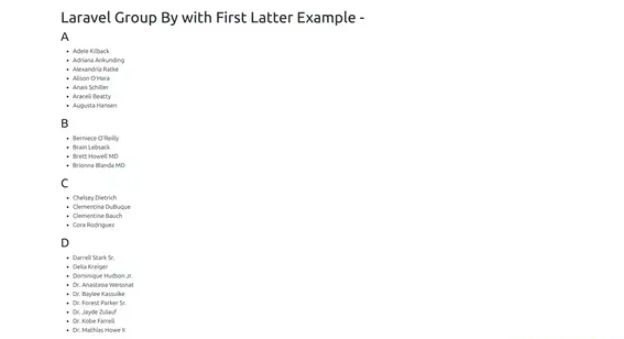
Step 1: Install laravel
Although it’s not necessary, you can use the following command if you haven’t already created the Laravel application:
composer create-project laravel/laravel exampleappStep 2: Create Controller
This step involves creating a UserController and using index() to gather records and categorize them according to it. So let’s use the command below to construct a controller.
php artisan make:controller UserControllerapp/Http/Controllers/UserController.php
<?php

namespace App\Http\Controllers;

use Illuminate\Http\Request;
use App\Models\User;
use DB;

class UserController extends Controller
{
    /**
     * Display a listing of the resource.
     *
     * @return \Illuminate\Http\Response
     */
    public function index(Request $request)
    {
        $users = User::select('name', DB::raw("SUBSTRING(name, 1, 1) as first_letter"))
                        ->orderBy('name')
                        ->get()
                        ->groupBy('first_letter');

        return view('users', compact('users'));
    }
}
Step 3: Add Route
routes/web.php
<?php

use Illuminate\Support\Facades\Route;

use App\Http\Controllers\UserController;

/*
|--------------------------------------------------------------------------
| Web Routes
|--------------------------------------------------------------------------
|
| Here is where you can register web routes for your application. These
| routes are loaded by the RouteServiceProvider within a group which
| contains the "web" middleware group. Now create something great!
|
*/

Route::get('users', [UserController::class, 'index']);
Step 4: Create View File
resources/views/users.blade.php
<!DOCTYPE html>
<html>
<head>
    <title>Laravel Group By with First Latter Example</title>
    <meta name="csrf-token" content="{{ csrf_token() }}">
    <link href="https://cdnjs.cloudflare.com/ajax/libs/twitter-bootstrap/5.0.1/css/bootstrap.min.css" rel="stylesheet">
</head>
<body>

<div class="container">
    <h1>Laravel Group By with First Latter Example</h1>

    @foreach ($users as $letter => $userGroup)
        <h2>{{ $letter }}</h2>
        <ul>
            @foreach ($userGroup as $user)
                <li>{{ $user->name }}</li>
            @endforeach
        </ul>
    @endforeach
</div>

</body>

</html>
Then run this command
php artisan serve
I’m Abhishek, a DevOps, SRE, DevSecOps, and Cloud expert with a passion for sharing knowledge and real-world experiences. I’ve had the opportunity to work with Cotocus and continue to contribute to multiple platforms where I share insights across different domains:
-
DevOps School – Tech blogs and tutorials
-
Holiday Landmark – Travel stories and guides
-
Stocks Mantra – Stock market strategies and tips
-
My Medic Plus – Health and fitness guidance
-
TrueReviewNow – Honest product reviews
-
Wizbrand – SEO and digital tools for businesses
I’m also exploring the fascinating world of Quantum Computing.
Best Cardiac Hospitals Near You
Discover top heart hospitals, cardiology centers & cardiac care services by city.
Advanced Heart Care • Trusted Hospitals • Expert Teams
View Best Hospitals
[…] Tutorial: Laravel Group By First Letter Example […]