1. Is there a Free Tier to test OpenAI API?
No. There is NO free tier for OpenAI API.
Important clarification:
- ChatGPT (website/app) ≠ OpenAI API
- Even if someone uses ChatGPT for free or has ChatGPT Plus, API usage is always paid
- New OpenAI API accounts do not receive free credits
What is free?
- Only listing models (
/v1/models) is free - Generating responses (
/v1/responses) is always paid
Conclusion:
👉 There is no free testing tier for OpenAI API.
2. Where to buy OpenAI API access?
OpenAI API access is purchased via billing setup, not a separate product.
Steps to buy API access:
- Create OpenAI account
- Go to OpenAI Platform → Billing
- Add credit/debit card
- Enable pay-as-you-go
- Generate an API key
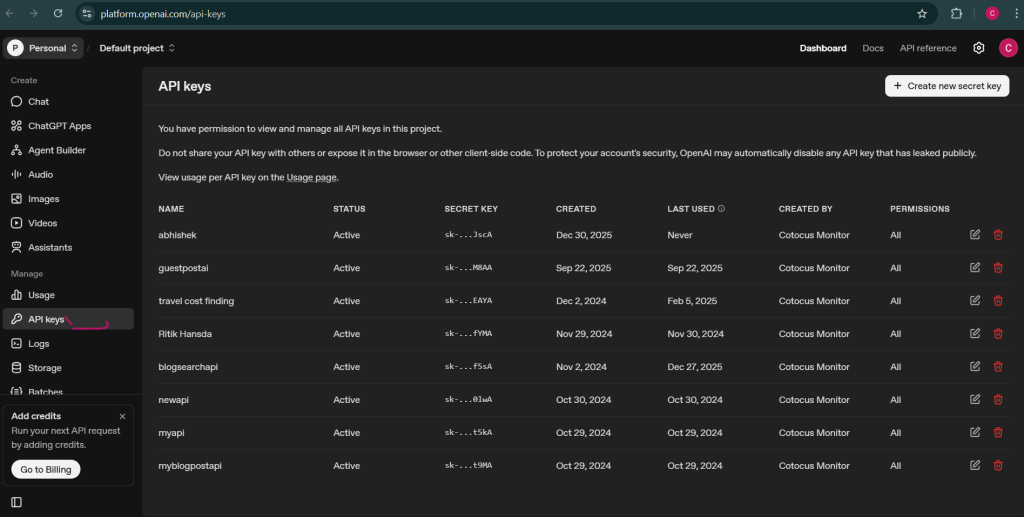
Once billing is enabled:
3.If API is already purchased, how to verify it is PAID?
✅ COMMANDS TO CHECK IF OPENAI API IS PAID
Platform: Windows CMD
Requirement:OPENAI_API_KEYmust be set
set OPENAI_API_KEY=sk-xxxxxxxxxxxxxxxx
✅ Command 1 (MOST IMPORTANT): Paid API Verification Test
This is the definitive test.
curl https://api.openai.com/v1/responses ^
  -H "Authorization: Bearer %OPENAI_API_KEY%" ^
  -H "Content-Type: application/json" ^
  -d "{ \"model\": \"gpt-4.1-mini\", \"input\": \"hi\", \"max_output_tokens\": 16 }"
✅ If API is PAID → You will see:
"status": "completed",
"billing": {
  "payer": "developer"
},
"usage": {
  "total_tokens": 18
}
❌ If API is NOT PAID → You will see:
"code": "insufficient_quota"
📌 Manager takeaway:
✔ payer: developer = PAID API
✅ Command 2: Token Charging Proof
Run the same command again and look for:
"usage": {
  "input_tokens": X,
  "output_tokens": Y,
  "total_tokens": Z
}
📌 Why this proves payment
- Tokens are counted only for paid requests
- Free / unpaid API calls never consume tokens
❌ Command 3 (Common Mistake): This DOES NOT Prove Payment
curl https://api.openai.com/v1/models ^
  -H "Authorization: Bearer %OPENAI_API_KEY%"
Why this is NOT valid proof:
- This endpoint is free
- Works even without billing
- Lists models only
📌 Never use /v1/models to verify payment
✅ Command 4: Billing Capability Check (Behavior Test)
curl https://api.openai.com/v1/responses ^
  -H "Authorization: Bearer %OPENAI_API_KEY%" ^
  -H "Content-Type: application/json" ^
  -d "{ \"model\": \"gpt-4.1-mini\", \"input\": \"test\" }"
Result meaning:
| Response | Meaning |
|---|---|
| Response generated | API is PAID |
insufficient_quota | API NOT paid / no balance |
invalid_api_key | Key problem |
🧾 FINAL VERIFICATION CHECKLIST
| Check | Expected |
|---|---|
Command 1 returns completed | ✅ |
Response shows payer: developer | ✅ |
| Tokens are counted | ✅ |
| GPT-4.1-mini responds | ✅ |
✅ Final conclusion:
The OpenAI API key is PAID and BILLING IS ACTIVE
🚨 IMPORTANT NOTES (Executive Level)
4. Why only GPT-4.1 (or earlier) models are working?
This is NOT a bug and NOT a billing issue.
OpenAI uses tier-based model access.
Current state:
gpt-4.1-mini→ ✅ Worksgpt-5,gpt-5-mini,gpt-5.2→ ❌ Not working
Error shown:
insufficient_quota
What this really means:
- The API key is valid
- Billing is active
- Account tier does not yet allow GPT-5 models
This is common for:
- New accounts
- Low historical spend
- Short billing history
Conclusion:
👉 GPT-4.1 works because it is allowed in the current account tier.
5. Why GPT-5 / GPT-5.2 is not working?
GPT-5 models are restricted to higher trust tiers.
They are unlocked automatically based on:
- Account age
- Paid usage history
- Total spend
- Stable, non-abusive usage patterns
There is:
- ❌ No “Enable GPT-5” button
- ❌ No manual approval request
- ❌ No shortcut
This is OpenAI’s security and cost-control policy.
6. How to unlock GPT-5 / GPT-5.2 (Official & Practical Method)
Step 1: Use allowed models consistently
Use:
gpt-4.1-mini(currently enabled)
Daily real usage:
- Content generation
- Summaries
- Blog sections
- Internal tools
Step 2: Build paid usage history
Recommended pattern:
- 300–1000 API requests per day
- Spread across the day (not bursts)
- Real prompts (not repeated spam)
Step 3: Increase billing limits
In OpenAI Billing Dashboard:
- Set Monthly limit: $50–$100
- Set Alert threshold: 80%
This does not mean spending all money, but signals readiness for higher tiers.
Step 4: Wait for automatic tier upgrade
Typical unlock timeline:
- 2–7 days for active paid usage
- Sometimes faster if spend reaches ~$50+
Once unlocked:
gpt-5-miniworks first- Then
gpt-5 - Then
gpt-5.2
No code changes required.
7. How to check which models are supported by our API key?
There is NO dashboard or API endpoint that shows “allowed models”.
The only valid method:
- Make a small test request to the model
- Observe the result
Interpretation:
| Result | Meaning |
|---|---|
| Response completed | Model supported |
insufficient_quota | Model exists but tier locked |
model_not_found | Wrong model name |
invalid_api_key | Key problem |
8. Recommended Production Strategy (Best Practice)
Use auto-fallback logic:
- Try
gpt-5.2 - If blocked → try
gpt-5 - If blocked → try
gpt-5-mini - If blocked → use
gpt-4.1-mini
This ensures:
- System works today
- Automatically upgrades when GPT-5 unlocks
- No redeployment needed later
9. Final Summary
- ✅ OpenAI API is paid only
- ❌ No free tier exists for API testing
- ✅ Our API key is active and billed
- ✅ GPT-4.1 works because our tier allows it
- ❌ GPT-5 / 5.2 are blocked due to account tier
- ✅ Unlock happens automatically with usage + spend
- ❌ No manual enablement possible
- ✅ Best current approach: use GPT-4.1-mini + auto-fallback
Add the following environment variables to your Laravel .env file:
OPENAI_API_KEY=XXXXXXXXXXXXXXXXXXXXXXX
OPENAI_MODEL=gpt-4o-mini

I’m Abhishek, a DevOps, SRE, DevSecOps, and Cloud expert with a passion for sharing knowledge and real-world experiences. I’ve had the opportunity to work with Cotocus and continue to contribute to multiple platforms where I share insights across different domains:
-
DevOps School – Tech blogs and tutorials
-
Holiday Landmark – Travel stories and guides
-
Stocks Mantra – Stock market strategies and tips
-
My Medic Plus – Health and fitness guidance
-
TrueReviewNow – Honest product reviews
-
Wizbrand – SEO and digital tools for businesses
I’m also exploring the fascinating world of Quantum Computing.
Best Cardiac Hospitals Near You
Discover top heart hospitals, cardiology centers & cardiac care services by city.
Advanced Heart Care • Trusted Hospitals • Expert Teams
View Best Hospitals