This guide combines everything from my two previous responses into a clear and structured tutorial you can follow or share with your team
🛑 The Problem
When running:
npm install @vitejs/plugin-react
You saw:
npm ERR! code EACCES
npm ERR! syscall mkdir
npm ERR! path /usr/sbin/.npm
npm ERR! errno -13
npm ERR! Your cache folder contains root-owned files...
This happens because:
- npm is using a global cache directory belonging to root.
- Files in
/root/.npmor/usr/sbin/.npmare not writable by your current user. - This happens if you ever ran
sudo npm installdirectly.
🚀 Goal
We will:
- Set npm cache and global directory to your user’s home folder (recommended).
- Fix permissions for
.npmfolders. - Update Laravel’s
Processcommand to avoid this issue in your Laravel installer.
🛠️ Step 1 – Check Current npm Cache Path
Run:
npm config get cache
If you see:
/root/.npm
This is the root cause of the error — npm is using a root-owned directory, even when running as a normal user.
🛠️ Step 2 – Set npm Global Directory to Your User Folder
Run:
mkdir -p ~/.npm-global
npm config set prefix '~/.npm-global'
npm config set cache '~/.npm-global/_cache'
This tells npm to:
- Install global packages to
~/.npm-global - Use
~/.npm-global/_cachefor cache files (under your home directory)
🛠️ Step 3 – Add npm Global Directory to PATH
You need to add the new npm global bin directory to your PATH so globally installed packages can be run.
Run this command to add it to ~/.bashrc (for Ubuntu/Debian):
echo 'export PATH=~/.npm-global/bin:$PATH' >> ~/.bashrc
source ~/.bashrc
🛠️ Step 4 – Fix Ownership of Old npm Folders
If you previously ran npm as sudo, you need to fix permissions for existing .npm folders:
sudo chown -R $USER:$USER ~/.npm ~/.npm-global
This ensures all files in these folders belong to your normal user.
🛠️ Step 5 – Verify It Worked
Run:
npm config get cache
Expected output:
/home/your-username/.npm-global/_cache
This confirms npm is now using a user-owned directory.
🛠️ Step 6 – Test npm Manually
Test:
npm install @vitejs/plugin-react
npm install react-places-autocomplete
npm run build
If no errors, you are all set!
🛠️ Step 7 – Fix Laravel’s InstallController (Optional)
If you have a Laravel installer that runs npm commands using:
$process = new Process(['npm', 'install', '@vitejs/plugin-react']);
You can make sure Laravel uses the correct PATH:
$env = array_merge($_ENV, [
    'PATH' => getenv('PATH') . ':' . getenv('HOME') . '/.npm-global/bin',
]);

$process = new Process(['npm', 'install', '@vitejs/plugin-react'], base_path(), $env);
This ensures the npm command will use your user-specific npm global folder, avoiding future permission errors.
All process in image
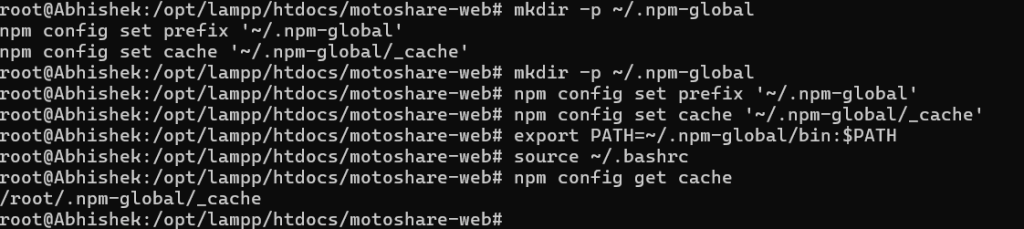
✅ Final Summary – All Commands Together
Here’s the full command list you can copy-paste to fix this issue:
# Check current npm cache location
npm config get cache

# Create and configure user-owned npm global folder
mkdir -p ~/.npm-global
npm config set prefix '~/.npm-global'
npm config set cache '~/.npm-global/_cache'

# Add npm global bin to PATH
echo 'export PATH=~/.npm-global/bin:$PATH' >> ~/.bashrc
source ~/.bashrc

# Fix ownership if needed
sudo chown -R $USER:$USER ~/.npm ~/.npm-global

# Verify cache location
npm config get cache

# Test npm commands
npm install @vitejs/plugin-react
npm install react-places-autocomplete
npm run build
📥 Optional – Full Bash Script (install-npm-fix.sh)
If you want, you can create a bash script so you can reuse it anytime.
Create install-npm-fix.sh:
nano install-npm-fix.sh
Paste this inside:
#!/bin/bash

echo "Fixing npm EACCES and root cache issues..."

mkdir -p ~/.npm-global
npm config set prefix '~/.npm-global'
npm config set cache '~/.npm-global/_cache'

echo 'export PATH=~/.npm-global/bin:$PATH' >> ~/.bashrc
source ~/.bashrc

sudo chown -R $USER:$USER ~/.npm ~/.npm-global

echo "npm cache location:"
npm config get cache

echo "npm setup complete!"
Make it executable:
chmod +x install-npm-fix.sh
Run it anytime with:
./install-npm-fix.sh
✅ Conclusion
This solves:
npm ERR! code EACCESnpm ERR! path /root/.npm- Ensures npm is 100% safe to use without sudo.
- Works for LAMPP, Ubuntu, Debian, or any Linux server.
🚀 Do you want me to generate and send this bash script as a ready-to-use file? Let me know!

I’m Abhishek, a DevOps, SRE, DevSecOps, and Cloud expert with a passion for sharing knowledge and real-world experiences. I’ve had the opportunity to work with Cotocus and continue to contribute to multiple platforms where I share insights across different domains:
-
DevOps School – Tech blogs and tutorials
-
Holiday Landmark – Travel stories and guides
-
Stocks Mantra – Stock market strategies and tips
-
My Medic Plus – Health and fitness guidance
-
TrueReviewNow – Honest product reviews
-
Wizbrand – SEO and digital tools for businesses
I’m also exploring the fascinating world of Quantum Computing.
Best Cardiac Hospitals Near You
Discover top heart hospitals, cardiology centers & cardiac care services by city.
Advanced Heart Care • Trusted Hospitals • Expert Teams
View Best Hospitals