Introduction
In the current landscape of cloud computing and complex software architectures, engineering organizations face unprecedented pressure to deliver features rapidly. Despite these modern demands, many infrastructure and engineering groups remain held back by manual operations.
When engineers must manually sign into virtual machines to adjust configurations, execute ad-hoc deployment scripts from their local terminals, or verify application health by manually reviewing log directories, operational velocity slows down. This hands-on approach exposes systems to human error, unexpected configuration drift, and production inconsistencies that are highly challenging to troubleshoot.
The complexity of modern applications compounds these challenges. Microservices frameworks, multi-cloud deployments, and strict compliance policies require coordinated operations across dozens of environments. If an enterprise relies on human memory and disjointed text documentation to guide these operations, scaling up operations sustainably becomes impossible.
This friction is exactly why senior enterprise mentors prioritize workflow automation above simple tooling upgrades. True digital transformation does not come from using isolated tools; it depends on orchestrating end-to-end pipelines that connect code development straight through to runtime monitoring.
To build a reliable delivery model, engineering organizations look to established learning programs and professional consultation frameworks. Organizations like DevOpsSchool provide structured training designed to bridge these operational gaps. Their curriculum teaches engineers how to transform manual, fragmented processes into predictable, self-documenting code.
By prioritizing cohesive automation blueprints over isolated scripts, IT organizations can establish reliable delivery cycles, improve system availability, and allow engineering talent to focus on core product design rather than repetitive maintenance tasks.
What Is Workflow Automation in DevOps?
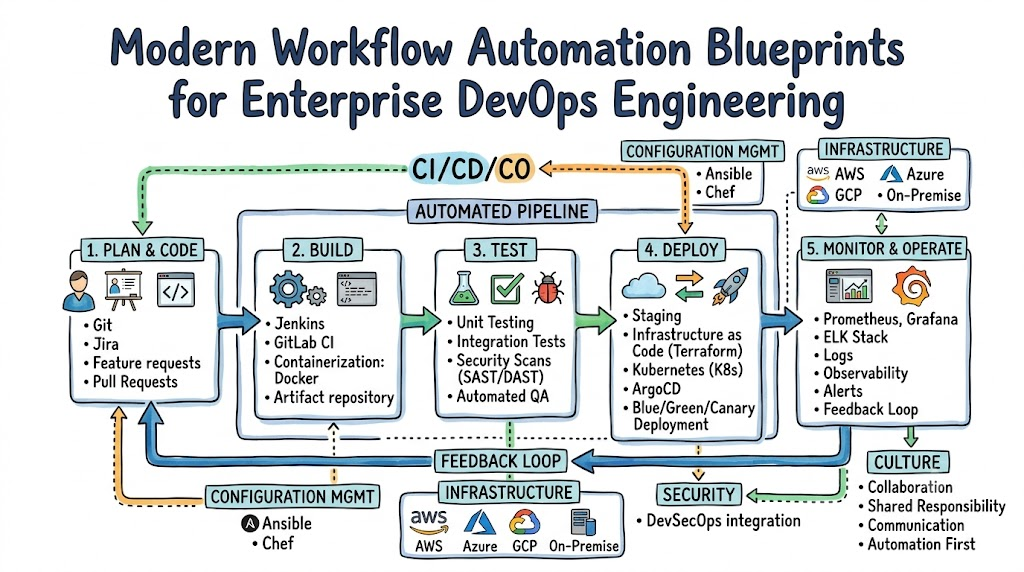
Workflow automation in DevOps is the intentional design and execution of self-operating processes across the entire software development life cycle. Rather than viewing automation as a series of isolated cron jobs or shell scripts on a local machine, enterprise architecture treats workflow automation as a continuous, unified pipeline. This system connects code repositories, testing frameworks, artifact management systems, infrastructure provisioning, and production monitoring into a cohesive lifecycle.
At its core, this practice targets repetitive, predictable tasks that consume human engineering hours and introduce operational risks. When an engineer commits code to a central branch, workflow automation manages the transitions between compiling the application, running test packages, verifying security standards, building container images, and deploying the application across staging and production environments.
This end-to-end structure ensures consistency across all deployment targets. An automated workflow executes the exact same sequence with the exact same parameters whether deploying to an internal test cluster or a production environment.
This uniformity removes the variance that occurs when different team members manage deployments manually. Ultimately, workflow automation turns institutional tribal knowledge into explicit, version-controlled code, allowing teams to scale their operations without scaling their operational errors.
Why Workflow Automation Matters
Implementing workflow automation directly addresses the velocity bottlenecks that slow down engineering teams. In a traditional IT environment, code updates are often delayed by cross-team handoffs, manual approval steps, and lengthy validation phases.
Automating these workflows eliminates wait times between different phases of the lifecycle. As soon as a developer finishes a task, the automated system runs validations and advances the code to the next stage immediately, accelerating code delivery from months to minutes.
Beyond increasing speed, automation lowers operational risk by eliminating manual interventions. Human operators are inherently prone to mistakes when performing repetitive technical steps, such as mistyping environment configurations or missing a step in a manual deployment document.
An automated pipeline executes code instructions precisely every single time, drastically reducing configuration errors. When human error is removed from the core deployment pipeline, software deployments become routine, stress-free tasks rather than high-risk operations.
Finally, workflow automation builds high operational stability into production environments. Because all infrastructure configurations, test suites, and deployment paths are codified, identifying the root cause of an issue becomes straightforward.
If an operational incident occurs, teams can inspect the execution logs of the automated pipeline to see exactly what changed, when it changed, and who approved it. This level of traceability simplifies regulatory compliance and helps teams maintain high availability for production applications.
Common Workflow Problems Without Automation
Operating an engineering group without integrated automation creates technical debt and operational silos. The table below outlines common problems teams encounter when managing workflows manually, along with their business impacts.
| Problem | Business Impact |
| Manual Deployments | Frequent production outages, extended deployment windows, high engineering burnout, and delayed feature releases. |
| Configuration Drift | Environment mismatches where staging behaves differently than production, leading to unexpected failures during releases. |
| Slow Incident Response | Extended Mean Time to Resolution (MTTR), prolonged downtime, loss of customer trust, and financial penalties from violated SLAs. |
| Repetitive Testing | Long QA feedback cycles, bottlenecks that delay releases, and untested code components entering production. |
| Monitoring Blind Spots | Undetected resource exhaustion, silent application errors, and failure to identify infrastructure issues before they impact users. |
Overview Table: Top Workflow Automation Strategies
To address these operational challenges, enterprise architects implement structured automation patterns across the technical stack. The following table provides an overview of these core strategies, their primary goals, and their practical outcomes.
| Strategy | Goal | Example Outcome |
| CI/CD Pipeline Automation | Accelerate code delivery and feedback | Code changes pass through validation and deploy to staging within 10 minutes of integration. |
| Infrastructure Automation | Eliminate manual environment setup | New cloud environments deploy across regions in minutes via declarative code files. |
| Automated Testing Strategy | Validate code changes early and often | Regression tests execute on every pull request, catching software bugs before build completion. |
| Monitoring and Alert Automation | Provide visibility into system state | Production issues trigger targeted alerts with debugging context before users experience a service disruption. |
| Security Automation | Integrate vulnerability scanning natively | Code dependencies and container base layers are scanned automatically during build phases. |
| Incident Response Automation | Accelerate system recovery times | Self-healing runbooks restart failed services or clear disk spaces without middle of the night pages to engineers. |
| Cloud Scaling Automation | Adapt infrastructure resources to real-time load | Compute clusters expand during unexpected traffic surges and shrink during low utilization windows. |
| Cost Optimization Automation | Control infrastructure expenditure | Non-essential staging environments shut down automatically outside of core working hours. |
Strategy #1: CI/CD Pipeline Automation
Continuous Integration and Continuous Deployment (CI/CD) serve as the foundation of any successful DevOps automation strategy. A modern CI/CD pipeline connects developer workspaces directly to production infrastructure. The workflow begins the moment an engineer pushes code to a shared repository, which automatically triggers a build runner via a webhook.
[Developer Push] ➔ [Webhook Trigger] ➔ [CI Build Runner]
                                              │
                     ┌────────────────────────┴────────────────────────┐
                     ▼                                                 ▼
          [Linter & Unit Tests]                              [Security Scanning]
                     │                                                 │
                     └────────────────────────┬────────────────────────┘
                                              ▼
                                   [Artifact Compilation]
                                              │
                                              ▼
                                 [Container Image Registry]
                                              │
                                              ▼
                                 [Staging Auto-Deployment]
This runner orchestrates a multi-step verification process. First, it pulls down the latest code, sets up the required environment runtime, and executes static analysis linters alongside the unit test suite. If any test fails or if the code violates syntax standards, the pipeline halts immediately and alerts the developer. This fast-feedback loop ensures that broken code never makes it past the initial validation stage.
When the code passes all initial checks, the pipeline moves forward to compile the application and build an immutable artifact, such as a Docker container image. This image is tagged with a unique version identifier and uploaded to a secure container registry.
From there, the continuous deployment component takes over. Using tools like Jenkins or GitHub Actions, the pipeline communicates with target environments to deploy the new container image using predictable, structured strategies like blue-green or canary releases.
YAML
# Example GitHub Actions Workflow Definition
name: Production Deployment Pipeline

on:
  push:
    branches:
      - main

jobs:
  validate-and-build:
    runs-on: ubuntu-latest
    steps:
      - name: Checkout Source Code
        uses: actions/checkout@v4

      - name: Initialize Node.js Runtime
        uses: actions/setup-node@v4
        with:
          node-version: '20'
          cache: 'npm'

      - name: Execute Project Dependencies Installation
        run: npm ci

      - name: Run Comprehensive Test Suite
        run: npm test

      - name: Execute Static Application Security Testing
        run: npm run security-scan

      - name: Build Production Distribution Artifact
        run: npm run build
By codifying this sequence in toolsets like Jenkins or GitHub Actions, organizations ensure that no unauthorized or untested code can access production servers. The entire software delivery pipeline becomes an automated, auditable gatekeeper that maintains high software quality at velocity.
Strategy #2: Infrastructure as Code Automation
Managing infrastructure manually by clicking through cloud management consoles or running standalone server scripts leads to environment inconsistencies and configuration drift. To address this, enterprise DevOps consultants implement Infrastructure as Code (IaC) strategies. This approach treats hardware definitions, networking structures, firewalls, and storage components as declarative code that is version-controlled in Git repositories.
Tools like Terraform allow engineering teams to write high-level configuration files that describe the desired final state of their infrastructure. When an engineer updates a Terraform configuration file, the tool calculates the difference between the current state of the cloud environment and the new target state defined in the code. It then generates an execution plan showing exactly which resources will be created, modified, or deleted before making any changes.
[Git Commit: IaC Code] ➔ [Terraform Plan Evaluation] ➔ [Approval Gate] ➔ [Terraform Apply Engine] ➔ [Target Cloud Infrastructure]
Consider a practical workplace scenario: an engineering team needs to provision a new microservice that requires an isolated Virtual Private Cloud (VPC), three private subnets, an application load balancer, and a managed database instance. Instead of submitting an infrastructure request ticket that takes days to process, the engineer defines these resources in a Terraform manifest.
Terraform
# Terraform Blueprint for Core Application Infrastructure
provider "aws" {
  region = "us-east-1"
}

resource "aws_vpc" "production_network" {
  cidr_block           = "10.0.0.0/16"
  enable_dns_hostnames = true

  tags = {
    Environment = "Production"
    ManagedBy   = "Terraform"
  }
}

resource "aws_subnet" "private_tier_one" {
  vpc_id            = aws_vpc.production_network.id
  cidr_block        = "10.0.1.0/24"
  availability_zone = "us-east-1a"

  tags = {
    Name = "Production-Private-Subnet-1A"
  }
}

resource "aws_lb" "application_ingress" {
  name               = "prod-core-ingress-balancer"
  internal           = false
  load_balancer_type = "application"
  subnets            = [aws_subnet.private_tier_one.id]
}
Once this code passes peer review, a CI/CD pipeline runs the plan and applies the changes to the cloud provider. This process guarantees that every environment created from these files is identical, eliminating configuration mismatches between staging and production platforms.
Strategy #3: Automated Testing Strategy
A major barrier to rapid software delivery is relying on manual quality assurance (QA) verification phases. When code changes accumulate for weeks before being passed to an isolated QA team for manual testing, feedback loops become long and inefficient. An automated testing strategy fixes this bottleneck by embedding multi-tiered validation checks directly into the core deployment lifecycle.
This automated testing framework is structured as a progressive funnel. The moment code changes are submitted, the system runs unit tests to validate the internal logic of individual code blocks.
Once those pass, the pipeline triggers integration tests to verify that the new code interacts correctly with external components, such as databases, internal microservices, and third-party APIs. By catching integration errors early, teams prevent complex architectural issues from reaching later deployment stages.
[Code Integration]
       │
       ▼
 ┌───────────┐
 │ Unit Tier │ ➔ (Fast validation of standalone functions)
 └─────┬─────┘
       ▼
 ┌───────────┐
 │ Int Tier  │ ➔ (Verifies internal components & database wireframes)
 └─────┬─────┘
       ▼
 ┌───────────┐
 │ E2E Tier  │ ➔ (Simulates absolute end-user transaction journeys)
 └───────────┘
The final validation stage involves end-to-end (E2E) testing and deployment validation within a staging environment that mirrors production. Automated browser testing tools simulate real user journeys—such as authenticating, adding items to a cart, and processing a transaction.
If the automated testing suite detects a broken user flow or a performance drop, the pipeline halts, prevents the code from moving to production, and provides engineers with full logs and stack traces. This systematic approach transforms testing from a late-stage manual hurdle into an automated, continuous asset.
Strategy #4: Monitoring and Alert Automation
Automation is not limited to the pre-production build and deployment phases; it is equally critical for maintaining system health post-release. When dealing with large-scale cloud infrastructure, relying on engineers to manually watch dashboard metrics is unsustainable. Monitoring and alert automation sets up continuous system oversight, allowing platforms to flag internal performance issues before they impact end users.
A resilient monitoring workflow uses open-source tools like Prometheus to scrape time-series metrics from applications and infrastructure nodes, while Grafana visualizes this data on real-time dashboards. The real power of this setup comes from automating alerts based on operational thresholds.
Instead of simple checks like monitoring high CPU usage, teams configure smart alerts that track user-facing indicators, such as elevated HTTP 5xx error rates, latency spikes, or sudden drops in successful checkouts.
[Prometheus Scrape Engine] ➔ [Alertmanager Evaluation] ➔ [Target Routing Engine]
                                                                │
                                   ┌────────────────────────────┴────────────────────────────┐
                                   ▼                                                         ▼
                     {Severity: Warning}                                       {Severity: Critical}
                                   │                                                         │
                                   ▼                                                         ▼
                       [Slack Async Notification]                                [PagerDuty On-Call Page]
When an alert fires, an automation component like Alertmanager processes the notification, groups related issues together to avoid alert fatigue, and routes the alert to the right destination based on severity. Minor warnings go to a shared team communication channel for asynchronous review.
If critical metrics cross a high-risk threshold, the system immediately pages the on-call engineer via incident response tools with full system context and runbook references. This structured data flow helps teams quickly isolate and fix production root causes.
Strategy #5: Security Automation
In standard legacy development models, security reviews are often conducted at the very end of the release lifecycle. This approach creates friction, as security teams frequently block deployments late in the process to fix vulnerabilities that should have been caught much earlier. DevSecOps addresses this by embedding automated security checkpoints directly into every phase of the CI/CD pipeline.
[Source Code Check-In]
          │
          ▼
┌──────────────────┐
│ Static (SAST)    │ ➔ (Scans source lines for hardcoded credentials/secrets)
└─────────┬────────┘
          ▼
┌──────────────────┐
│ Software (SCA)   │ ➔ (Checks third-party open-source libraries for vulnerabilities)
└─────────┬────────┘
          ▼
┌──────────────────┐
│ Container Scan   │ ➔ (Audits underlying OS binaries inside base images)
└──────────────────┘
The security automation process begins with Static Application Security Testing (SAST) tools, which scan source code for exposed api keys, hardcoded credentials, and common coding flaws like SQL injection vectors. At the same time, Software Composition Analysis (SCA) tools audit third-party open-source libraries against public vulnerability databases. If a developer unknowingly imports a library with a critical security bug, the build pipeline catches it and blocks the build.
Finally, as container images are built, automated scanners inspect the underlying operating system binaries inside the base image. If any vulnerabilities are found, the system flags them immediately.
Automating these security scans ensures that every piece of code deployed to production complies with security policies by default, allowing organizations to maintain high security standards without slowing down development momentum.
Strategy #6: Incident Response Automation
When production incidents happen, every minute of downtime can mean lost revenue and reduced customer trust. Relying entirely on manual troubleshooting—where engineers must wake up, log into systems, search through unorganized log files, and run manual commands—increases recovery times. Incident response automation accelerates this recovery by executing pre-programmed actions the moment a production error is detected.
This strategy uses event-driven automation frameworks that listen for specific alerts from monitoring tools. When a system alert triggers—such as a critical microservice running out of memory or a database connection pool locking up—the event engine matches the incoming alert to a secure, automated runbook script.
[Microservice Out Of Memory] ➔ [Monitoring Engine Alert] ➔ [Event Automation Bus]
                                                                   │
                                                                   ▼
                                                    [Automated Runbook Execution]
                                                                   │
                                   ┌───────────────────────────────┴───────────────────────────────┐
                                   ▼                                                               ▼
                     [Capture JVM Thread Dumps]                                      [Graceful Pod Restart]
Consider an out-of-memory error on a core application service. Before paging a human engineer at midnight, the automated response system executes a runbook that safely captures a memory heap dump for analysis, clears temporary cache storage, and gracefully restarts the service container.
If the service returns to normal parameters, the system logs the incident with full debugging data and closes the ticket automatically. A notification is sent to the engineering team the next morning for review. By automating these initial triage and recovery steps, organizations dramatically reduce their Mean Time to Resolution (MTTR) and protect engineering teams from alert fatigue.
Strategy #7: Cloud Auto-Scaling Automation
Predicting infrastructure compute demands accurately is a significant challenge for modern enterprise teams. Over-provisioning infrastructure guarantees performance during usage spikes but results in expensive, idle resources during low-traffic periods. Under-provisioning saves money but leads to dropped requests and slow performance for users when traffic surges. Cloud auto-scaling automation solves this by dynamically adjusting compute resources in real time based on actual system demand.
In container environments managed by platforms like Kubernetes, this automation works via two coordinated scaling mechanisms:
- Horizontal Pod Autoscaler (HPA): This component tracks real-time resource usage, such as CPU utilization or memory metrics, across application containers. If an application experiences a traffic spike that pushes average CPU consumption past a set limit (e.g., 70%), the HPA automatically provisions more application containers to distribute the load.
- Cluster Autoscaler: If the physical nodes within the cloud cluster run out of capacity to host these new containers, the Cluster Autoscaler talks to the underlying cloud provider to provision new virtual machines and add them to the cluster resource pool.
[Traffic Surge] ➔ [CPU Exceeds Threshold] ➔ [HPA Spawns Pods] ➔ [Cluster Autoscaler Adds Node]
When traffic subsides, the autoscaling system safely scales down excess containers and terminates unneeded cloud instances. This automated scaling loop ensures that applications remain stable and responsive during high-demand events while maintaining cost efficiency during off-peak hours.
Strategy #8: Cost Optimization Automation
As organizations scale their cloud footprints across multiple business units and geographic regions, unmanaged infrastructure spend can easily outpace budgets. A common source of wasted cloud spend is idle development, testing, and staging environments left running outside of normal working hours. Cost optimization automation prevents this waste by automatically managing resource states based on usage patterns.
Using cloud-native tagging and scheduling automation, engineering teams implement policies that scan infrastructure metadata daily. For example, any testing cluster tagged with an environment classification of “Development” can be targeted by an automated policy that safely shuts down its virtual instances at the end of the working day.
[Clock Hits 19:00] ➔ [Scan Active Cloud Instances] ➔ [Isolate "Development" Tag] ➔ [Trigger Safe Shutdown]
YAML
# Conceptual Automated Resource Schedule Configuration
version: '1.0'
policy:
  name: StagingEnvironmentCostContainment
  target_tags:
    environment: "Development"
    cost_center: "Engineering"
  schedule:
    suspend_operations: "00 19 * * 1-5"  # Automatically pause resources at 7:00 PM Monday-Friday
    resume_operations: "00 07 * * 1-5"   # Automatically restore resources at 7:00 AM Monday-Friday
When engineers return the next morning, the scheduling engine automatically restarts the instances, ensuring they are ready for use. Additionally, these automated policies search for and delete detached block storage volumes, old snapshot backups, and unassigned public IP addresses. Automating these cost-control measures protects enterprise cloud budgets without requiring manual auditing from finance or engineering teams.
Real-World Example: Company Without Automation
To see the value of integrated automation, look at a traditional financial services group operating without automated workflows. In this organization, code transitions are slow and manual. Developers write code locally and hand it off via tracking tickets to an isolated QA team. This team spends days manually running test spreadsheets, creating a significant delivery bottleneck.
When a release window opens, operations engineers use manual checklists to deploy the software. An engineer must log into multiple production servers via SSH, copy runtime files across the network, manually modify environment configuration strings, and restart system services.
Because environments are updated manually, subtle configuration differences inevitably crop up between servers. A missing dependency package or an incorrect environment variable on one server can cause random runtime errors that are incredibly difficult to diagnose.
[Developer Code] ➔ [Manual Ticket to QA] ➔ [Days of Manual Testing] ➔ [Manual SSH Deployments] ➔ [Production Failures]
If an outage occurs under this manual model, the team faces severe operational stress. With no centralized logging or automated alerts, engineers must manually search through log files on multiple machines to find the root cause.
Meanwhile, deployment rollbacks require reversing the manual commands by hand, which increases downtime and impacts customers. This cycle of high-risk releases, frequent outages, and long recovery windows strains the business and causes significant burnout across engineering teams.
Real-World Example: Company Using Automation Successfully
In contrast, consider a modern enterprise software platform that uses automated workflows throughout its delivery cycle. Here, infrastructure configurations, deployment pipelines, and validation steps are completely codified. When a developer creates a code update, a GitHub Actions pipeline automatically triggers to handle testing and dependency verification.
The code is compiled into an immutable container image and deployed to a staging environment using Terraform. Automated regression and integration tests run immediately to validate the release.
Once these tests pass, the artifact is cleared for production. The deployment uses a canary strategy managed by automated orchestration tools, routeing a small fraction of live user traffic (e.g., 5%) to the new release while monitoring system health.
[Developer Push] ➔ [Auto-Test & Containerize] ➔ [IaC Staging Deploy] ➔ [Canary Production Release] ➔ [Auto-Metrics Verification]
If the monitoring tools detect any performance drops or error spikes during the canary phase, the pipeline automatically shifts live traffic away from the new deployment and back to the stable version.
No human intervention is required to prevent a widespread outage. Because every step is automated and tracked in version control, the platform can release code updates confidently multiple times a day with high operational stability and clear visibility across the organization.
Common Automation Mistakes
Building out automation requires careful planning and strategy. When teams automate without clear goals, they risk creating complex, unreliable systems that can cause more harm than good. The checklist below highlights common pitfalls to avoid when implementing automation:
- Automating Broken Processes: Automating a flawed manual process simply executes inefficient steps faster. Teams must optimize and streamline the underlying workflow before writing automation code.
- Tooling Overload: Adopting too many specialized tools without a unifying strategy creates integration silos and increases technical complexity. Focus on a cohesive toolset that connects easily across your stack.
- Neglecting Pipeline Monitoring: Pipelines are software systems themselves and can fail. A lack of logging and visibility into automated workflows makes it incredibly difficult to find and fix pipeline failures.
- Hardcoding Sensitive Data: Placing API keys, database credentials, or environment secrets directly into pipeline scripts introduces significant security risks. Always use dedicated secret management tools.
- Skipping Automated Testing for Infrastructure Code: Treating Terraform manifests or configuration scripts as unverified code can lead to infrastructure errors. Always validate and test infrastructure changes before applying them to production.
Common Beginner Misunderstandings
When starting out with DevOps practices, it is easy to misinterpret the core goals of automation. The following checklist addresses common myths and clarifies the real-world scope of automation:
- Myth: Automation Solves All Operational Problems: Automation brings predictability and speed, but it cannot fix broken team communication or poor software architecture. It is an operational tool, not a cure-all for organizational issues.
- Myth: DevOps and Automation Are the Same Thing: Automation is a key technical enabler, but true DevOps requires a cultural shift focused on collaboration, shared responsibility, and continuous improvement across development and operations teams.
- Myth: More Automation is Always Better: Over-automating simple, rarely performed tasks can introduce unnecessary complexity. The engineering effort required to build and maintain automation should always be balanced against its practical value.
- Myth: Small Teams Don’t Need Automated Workflows: Even small teams benefit from basic automation early on. Setting up simple CI/CD pipelines and basic infrastructure configurations early prevents messy technical debt from accumulating as the team grows.
Best Practices for Workflow Automation
To build stable, effective automated pipelines, enterprise consultants rely on core engineering principles. The following checklist outlines actionable best practices for designing and scaling your automation workflows:
- Start with Small, Incremental Scopes: Avoid trying to automate the entire software lifecycle all at once. Begin by automating small, high-impact tasks—like static linting or unit testing—and gradually expand your pipelines over time.
- Enforce Immutable Artifact Strategies: Compile application packages and build container images once during the initial build phase. Use this exact same artifact across all subsequent testing, staging, and production environments to guarantee consistency.
- Ensure Workflows Are Idempotent: Design infrastructure scripts and automation runbooks to be idempotent, meaning they can run multiple times safely without changing the system state if no updates are needed.
- Maintain Version Control for All Automation Code: Store CI/CD files, configuration scripts, and infrastructure code in central repositories. This ensures all changes are peer-reviewed and fully auditable.
- Establish Clear Visibility and Feedback Loops: Connect pipeline status notifications directly to your team’s communication channels. This ensures developers are alerted immediately if a build fails or an error occurs.
Role of DevOpsSchool in Learning Automation
Building and maintaining dependable automation systems requires a solid understanding of modern tools, cloud architectures, and operational practices. For engineers and organizations looking to build these technical skills, structured education programs provide a practical roadmap.
Programs offered by DevOpsSchool focus on hands-on learning, helping students move beyond theoretical knowledge to master the actual implementation of production-grade workflows.
Their educational framework centers on building a practical engineering mindset. Students work directly with industry-standard tools, configure continuous integration paths, write infrastructure code, and set up centralized monitoring systems.
By practicing with real-world scenarios, engineers learn how tools interact across a complete deployment pipeline, how to debug complex infrastructure errors, and how to design resilient self-healing runbooks. This hands-on training helps professionals build the practical skills needed to lead automation initiatives within their organizations.
Career Importance of Workflow Automation Skills
As enterprises adopt cloud-native architectures, the demand for professionals who understand workflow automation continues to grow. Organizations are moving away from traditional, siloed infrastructure roles toward engineering titles that emphasize automation, platform reliability, and system scalability.
                       ┌────────────────────────┐
                       │   DevOps Professional  │
                       └───────────┬────────────┘
                                   │
         ┌─────────────────────────┼─────────────────────────┐
         ▼                         ▼                         ▼
┌──────────────────┐      ┌──────────────────┐      ┌──────────────────┐
│  SRE Specialist  │      │ Platform Engineer│      │  Cloud Architect │
├──────────────────┤      ├──────────────────┤      ├──────────────────┤
│ Focus: Maximize  │      │ Focus: Internal  │      │ Focus: Core Multi│
│ System Up-time & │      │ Developer Portals│      │ Cloud Design and │
│ Rapid MTTR       │      │ & Golden Paths   │      │ Infrastructure   │
└──────────────────┘      └──────────────────┘      └──────────────────┘
High-Demand Technical Roles
- DevOps Engineer: Focuses on designing, maintaining, and optimizing the central CI/CD delivery pipelines, managing environments, and improving deployment speeds.
- Site Reliability Engineer (SRE): Concentrates on production availability, systemic latency, incident response automation, and enforcing operational error budgets.
- Platform Engineer: Builds internal developer portals and reusable automation templates to provide product teams with secure, self-service infrastructure options.
- Cloud Infrastructure Architect: Designs the foundational networking, security perimeters, and multi-region cloud structures managed via Infrastructure as Code templates.
Core Skill Sets Required for Success
- CI/CD Pipeline Design: Proficiency in writing declarative workflows for tools like GitHub Actions, GitLab CI, or Jenkins.
- Infrastructure Declarations: Expertise in writing modular, reusable configurations with IaC tools like Terraform or OpenTofu.
- System Telemetry Mastery: A solid understanding of metrics collection, log aggregation, and alerting configurations using tools like Prometheus and Grafana.
- Technical Troubleshooting Logic: The ability to analyze pipeline logs, trace application errors, and automate recovery workflows for production incidents.
Industries Using Workflow Automation
Automation has become essential across industries where operational velocity, data security, and system reliability are core business requirements.
SaaS Platforms
Software-as-a-Service companies rely heavily on workflow automation to stay competitive. These organizations deploy code updates multiple times a day to deliver features to users quickly.
Automated canary rollouts, horizontal auto-scaling, and continuous performance monitoring ensure these platforms can scale smoothly during heavy usage without requiring manual adjustments from engineers.
Banking and Financial Technologies
In financial services, security and regulatory compliance are top priorities. FinTech systems use automated pipelines to enforce strict security standards by default.
Every code change goes through automated vulnerability scanning, open-source license audits, and identity verification checks. This automated compliance trail ensures that software updates follow strict regulatory guidelines while keeping deployment pipelines moving efficiently.
Healthcare Infrastructures
Healthcare technology providers must protect sensitive patient information while maintaining high system availability. These groups use automated environments to isolate data and ensure infrastructure complies with regulations like HIPAA.
Automated incident response runbooks handle system issues immediately, protecting critical health applications from extended downtime and ensuring reliable access to patient data.
E-Commerce Operations
Online retailers deal with highly unpredictable traffic patterns, experiencing major demand surges during seasonal sales and holiday events. E-commerce platforms use cloud auto-scaling automation to dynamically add server capacity as traffic grows and scale down resources when demand drops.
Simultaneously, automated end-to-end testing continuously verifies core user flows—such as searching for items, adding products to a cart, and processing payments—ensuring a smooth shopping experience.
Future of Workflow Automation
The field of workflow automation is shifting away from static, human-written scripts toward smarter, self-optimizing systems. As applications become more complex, automation frameworks are evolving to handle routine maintenance tasks independently, allowing engineering teams to focus on higher-value work.
[Static Text Scripts] ➔ [Declarative Pipeline Code] ➔ [Self-Healing & Platform Engineering Platforms]
A major trend in this evolution is the growth of Platform Engineering and internal developer platforms (IDPs). Instead of requiring every developer to write their own complex deployment scripts from scratch, platform engineering groups provide secure, pre-validated automation templates.
Developers can use these templates to provision infrastructure, set up pipelines, and configure monitoring paths safely through self-service portals, maintaining consistent standards across the organization.
Additionally, production systems are becoming increasingly adaptive through self-healing architectures. Future automation tools will go beyond simple metric tracking to analyze live system behavior using advanced log and trace analysis.
If an application performance anomaly is detected, the platform can isolate the failing component, adjust routing rules, or scale up resources dynamically before a human operator even realizes there is an issue. This shift toward autonomous operations helps enterprises build highly resilient systems that adapt to changing production conditions in real time.
FAQs
What is workflow automation in DevOps?
Workflow automation in DevOps is the practice of converting manual, repetitive steps across the software development lifecycle into reliable, code-driven processes. This involves connecting version control repositories, automated testing frameworks, infrastructure provisioning tools, and deployment systems into a single, continuous pipeline that runs without requiring human intervention.
Why is automation important?
Automation is critical because it removes human error from routine tasks, accelerates feature delivery, ensures consistency across software environments, and provides clear visibility into system changes. By automating repetitive tasks, engineering organizations can deliver updates faster and allow developers to focus on building features rather than handling manual operations.
Which tools help automate workflows?
Teams use a variety of tools depending on the layer of the technical stack:
- CI/CD Pipelines: GitHub Actions, Jenkins, GitLab CI.
- Infrastructure as Code: Terraform, OpenTofu.
- Monitoring and Telemetry: Prometheus, Grafana.
- Container Orchestration: Kubernetes.
Can automation reduce failures?
Yes, well-designed automation significantly reduces software failures. Automated systems execute identical configurations and validation steps every single time, eliminating the variance and mistakes that come with manual operations. Furthermore, automated testing catches bugs early in the delivery lifecycle, preventing broken code from ever reaching production.
What is Infrastructure as Code?
Infrastructure as Code (IaC) is the practice of defining, provisioning, and managing cloud hardware resources using declarative text files rather than manual point-and-click cloud consoles or custom configuration scripts. This allows teams to version-control their infrastructure, run peer reviews on environment updates, and guarantee that staging and production environments are identical.
Does automation improve reliability?
Automation improves system reliability by making deployments predictable, repeatable, and easily auditable. If an unexpected issue occurs in production, automated rollback systems can instantly return the environment to its last-known stable state, minimizing downtime and protecting user experience.
Can beginners learn automation?
Yes, beginners can absolutely learn automation. It is best to start with fundamental skills, such as learning core Linux terminal commands, understanding basic Git workflows, and writing simple continuous integration scripts. From there, learners can gradually progress to more advanced topics like containerization, infrastructure declaration, and cloud telemetry systems.
Do small teams need automation?
Yes, small teams benefit immensely from setting up basic automation early on. Implementing simple CI/CD checkouts and foundational infrastructure blueprints early prevents technical debt from building up as the company scales, ensuring the engineering team remains agile and efficient.
What is the difference between CI and CD?
Continuous Integration (CI) focuses on automatically merging, building, and validating code changes whenever a developer commits updates to a shared repository. Continuous Deployment (CD) takes those validated changes and automatically deploys them straight through to production environments, ensuring new features reach users quickly and safely.
How does automation improve security?
Security automation builds compliance checks directly into development pipelines. By running automated scans for hardcoded secrets, analyzing third-party dependencies for vulnerabilities, and checking container configurations during the build phase, teams can catch and fix security issues before code ever reaches production.
What is configuration drift?
Configuration drift occurs when manual updates, quick bug fixes, or ad-hoc adadjustments are made directly to live servers without updating the central infrastructure code. Over time, this causes environments to drift away from their documented state, leading to unexpected deployment failures and hard-to-debug runtime issues.
What is a canary deployment?
A canary deployment is a release strategy where a new software update is rolled out to a small percentage of live user traffic (e.g., 5%) while the rest continues to use the stable version. Automated monitoring tools track the performance of the update; if no errors are detected, the system safely rolls out the release to the rest of the infrastructure.
What does Mean Time to Resolution (MTTR) mean?
Mean Time to Resolution (MTTR) measures the average time it takes an engineering team to identify, troubleshoot, and fix a production failure or service outage. Workflow automation lowers MTTR by triggering automated diagnostic alerts and executing self-healing runbooks to restore services quickly.
Is coding required for DevOps automation?
Yes, a foundational understanding of coding and scripting languages is essential for building modern automation. DevOps engineers write pipeline configurations in formats like YAML and JSON, define cloud resources using tools like Terraform, and write utility scripts in languages like Python or Bash to connect different systems across their environments.
How do teams prevent alert fatigue?
Teams avoid alert fatigue by configuring monitoring platforms to group related notifications together and prioritizing alerts based on user-facing impact rather than simple infrastructure metrics. For example, triggering pages for a critical drop in successful user checkouts rather than a temporary spike in server CPU usage keeps alerts actionable and focused.
Final Thoughts
Transitioning away from manual operational processes to adopting structured workflow automation strategies is a key step for modern engineering organizations aiming to scale. However, successful automation is not just about adopting new tools; it requires careful planning, standardizing workflows, and committing to treating all infrastructure and pipeline steps as version-controlled code.
When building out automated systems, it is essential to prioritize pipeline visibility alongside execution speed. High-velocity builds lose value if engineering teams cannot track deployment states or diagnose pipeline failures quickly.
By starting with small, high-impact improvements, enforcing immutable artifact strategies, and integrating continuous security validations, teams can build reliable delivery pipelines that scale smoothly alongside cloud growth.
Ultimately, investing in workflow automation transforms operations from a reactive bottleneck into a reliable, strategic asset. When engineering teams spend less time manually fixing server environments and managing stressful deployments, they can focus their energy on building great software, driving innovation, and delivering continuous value to users.

Best Cardiac Hospitals Near You
Discover top heart hospitals, cardiology centers & cardiac care services by city.
Advanced Heart Care • Trusted Hospitals • Expert Teams
View Best Hospitals