Let’s look at how to validate international phone numbers using jQuery, how to validate international phone numbers with a country code, how to validate international phone numbers in Laravel 10, and how to validate international phone numbers using JavaScript and JQuery.
Here, we validate using the International Telephone Input plugin. A plugin called International Telephone Input was created using only JavaScript to handle international phone numbers. It simplifies the process for both you and your users to validate phone numbers before storing them in your backend.
Example:
<html lang="en">
<head>
	<title>How To Validate International Phone Number Using jQuery</title>
	<link rel="stylesheet" href="https://cdn.jsdelivr.net/npm/intl-tel-input@18.1.1/build/css/intlTelInput.css">
</head>
<body>
	<div class="col-md-6 offset-md-2">
		<div class="container mt-5">
			<div class="card">
				<div class="card-header">
					<strong>How To Validate International Phone Number Using jQuery f</strong>
				</div>
				<div class="card-body">
					<h6 class="card-title">Phone Number:</h6>
					<input id="phone" type="tel">
					<span id="valid-msg" class="hide">✓ Valid</span>
					<span id="error-msg" class="hide"></span>
				</div>
			</div>
		</div>
	</div>
</body>
</html>
<script src="https://cdn.jsdelivr.net/npm/intl-tel-input@18.1.1/build/js/intlTelInput.min.js"></script>
CSS:
.hide {
  display: none;
}
#valid-msg {
  color: #00c900;
}
JQuery:
const input = document.querySelector("#phone");
const errorMsg = document.querySelector("#error-msg");
const validMsg = document.querySelector("#valid-msg");

// here, the index maps to the error code returned from getValidationError - see readme
const errorMap = ["Invalid number", "Invalid country code", "Too short", "Too long", "Invalid number"];

// initialise plugin
const iti = window.intlTelInput(input, {
	utilsScript: "https://cdn.jsdelivr.net/npm/intl-tel-input@18.1.1/build/js/utils.js"
});

const reset = () => {
	input.classList.remove("error");
	errorMsg.innerHTML = "";
	errorMsg.classList.add("hide");
	validMsg.classList.add("hide");
};

// on blur: validate
input.addEventListener('blur', () => {
	reset();
	if (input.value.trim()) {
		if (iti.isValidNumber()) {
			validMsg.classList.remove("hide");
		} else {
			input.classList.add("error");
			const errorCode = iti.getValidationError();
			errorMsg.innerHTML = errorMap[errorCode];
			errorMsg.classList.remove("hide");
		}
	}
});

// on keyup / change flag: reset
input.addEventListener('change', reset);
input.addEventListener('keyup', reset);
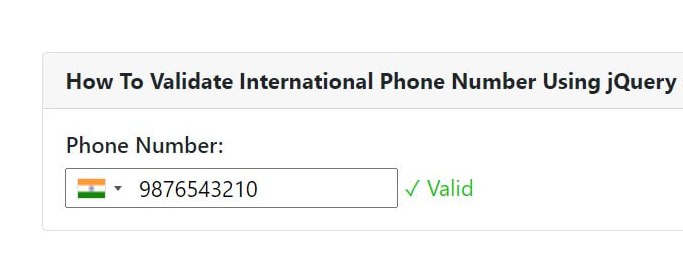
Output:

I’m Abhishek, a DevOps, SRE, DevSecOps, and Cloud expert with a passion for sharing knowledge and real-world experiences. I’ve had the opportunity to work with Cotocus and continue to contribute to multiple platforms where I share insights across different domains:
-
DevOps School – Tech blogs and tutorials
-
Holiday Landmark – Travel stories and guides
-
Stocks Mantra – Stock market strategies and tips
-
My Medic Plus – Health and fitness guidance
-
TrueReviewNow – Honest product reviews
-
Wizbrand – SEO and digital tools for businesses
I’m also exploring the fascinating world of Quantum Computing.
Best Cardiac Hospitals Near You
Discover top heart hospitals, cardiology centers & cardiac care services by city.
Advanced Heart Care • Trusted Hospitals • Expert Teams
View Best Hospitals
[…] How to Use jQuery to Validate an International Phone Number […]